Read and edit a stakeholder profile
Read and edit a stakeholder profile
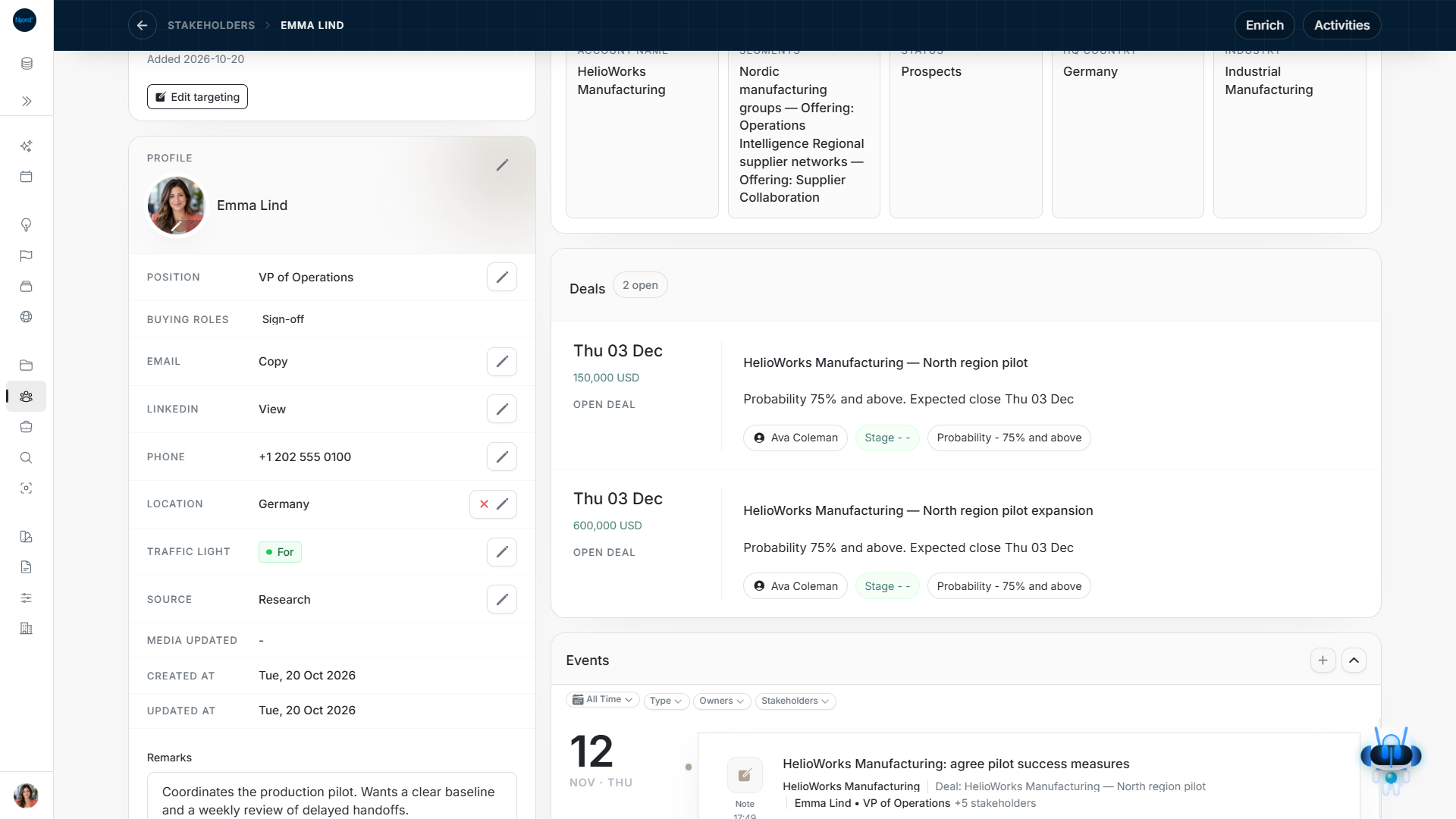
Open a stakeholder's Profile to check who they are, how to contact them and what you know about them. Ad Targeting is shown above Profile and has its own controls.
Profile fields
| Field | What to check |
|---|---|
| First Name | The saved first name. Open the name editor to correct it. |
| Last Name | The saved last name. Check the full name and company before making a correction. |
| Photo | Use the photo control when available to identify the person. |
| Position | Their current job title. |
| Buying roles | How they may influence a purchase, such as Champion or Sign-off. |
| Their saved email address. Use Copy when needed. | |
| Their saved professional profile. | |
| Phone | Their saved phone number. |
| Location | Their country or saved location. |
| Traffic Light | Your recorded view of the relationship. |
| Source | Where the contact came from. |
| Media Updated | When their media data was last updated. |
| Created At | When the person record was first saved. |
| Updated At | When the person record was last updated. Open Activities for the changes recorded on the profile. |
| Remarks | Your notes and saved professional context. |
Image guide: This fictional profile shows Emma’s position, buying role and contact fields. Use the edit control beside the field you need.
Edit a detail
- Check the person's name and company.
- Open the edit control beside the field.
- Enter or choose the value, then save.
- Check that the saved value appears.
For Buying roles, tick one or more roles and choose Save. Untick every role to clear them. For missing or updated information, use Enrich, then review its suggestions before saving.
Edit the company's Segments on the Account
The Linked Account card shows the company's saved Segments. Choose Go to Account to change them. You do not assign a separate company Segment to the person.
Buying roles does not require a Segment or Buying Logic. A person's role, job title and Audience membership are separate choices.
Keep the job title and purchase role separate
For example, Emma’s Position can be VP of Operations while her Buying roles include Sign-off. Enrich can propose a changed job title; accepting it does not assign Sign-off or add her to every Deal. Review the company, job title, Buying roles and actual Deal assignments separately before planning outreach.
Use Traffic Light when reviewing a deal
Open Traffic Light and select the stance supported by the information you have.
| Choice | When to use it |
|---|---|
| Cold | You have little evidence of a current relationship or position. |
| Against | You have evidence the stakeholder opposes the proposed change. |
| Neutral | You have evidence of their involvement and have recorded a neutral stance. |
| For | You have evidence the stakeholder supports the proposed change. |
Save the choice and check it in the profile. Use Buying roles for the person's role in the decision and Media Impact for measured ad activity. When reviewing a deal, confirm the person is assigned to it before looking for them in its Stakeholders Traffic Light panel.