Use Njord AI on an account
Use Njord AI on an account
The AI section helps summarize the account and suggest next actions. Use it after checking the account context so the prompt is grounded in what you are seeing.
Open AI from the account page
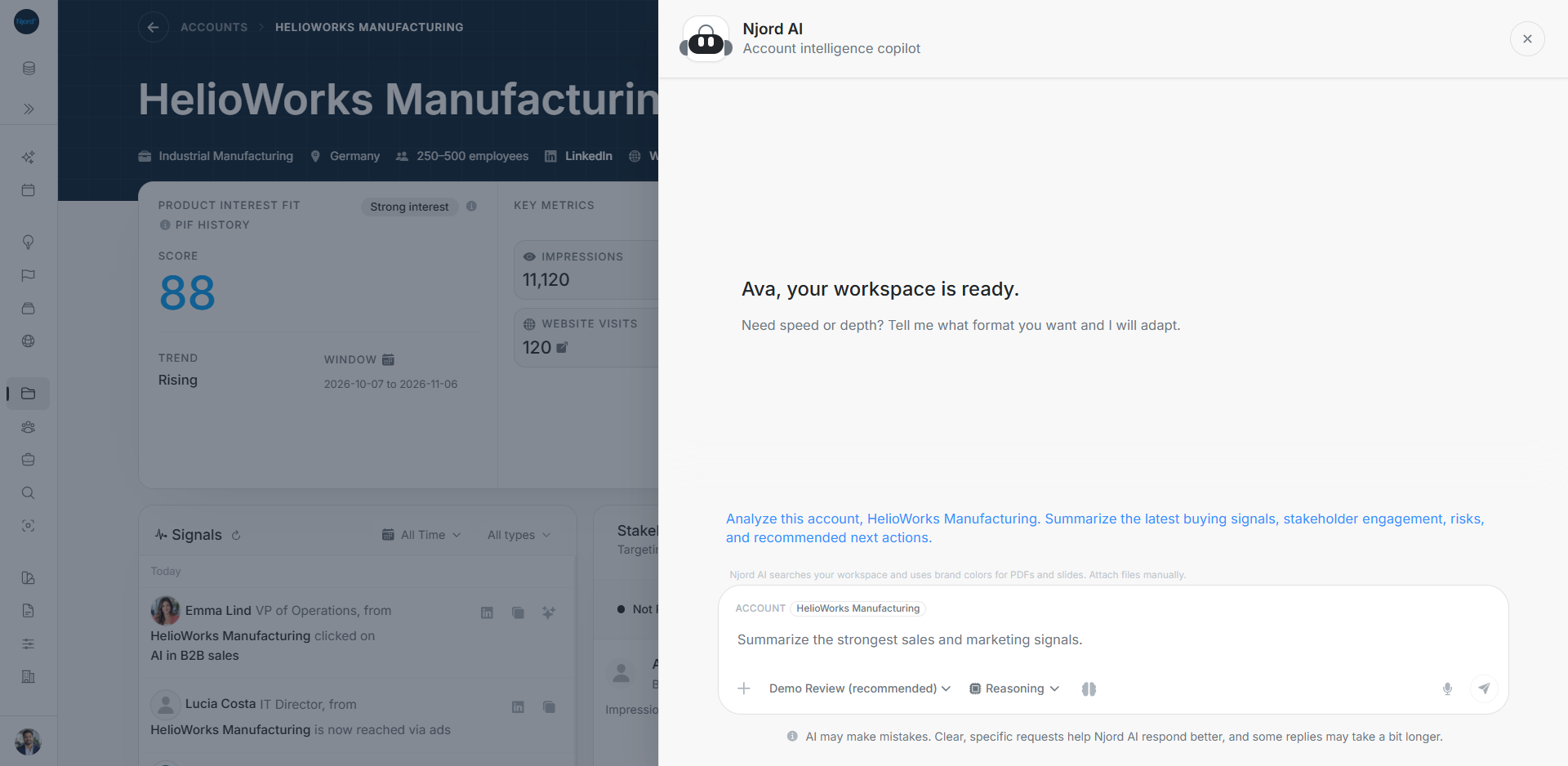
Open the account you want to review, then choose its Njord AI shortcut. Check the account name on the attached context chip before writing a question. The assistant opens with that record attached; review the suggested question before sending it.
Start with the account shortcut
Choose the blue suggested prompt when it matches your task, or write your own question. Check the attached ACCOUNT chip names HelioWorks Manufacturing before sending.
For example, ask “Summarize the latest engagement, name the evidence and suggest three actions before our next review.” Add a time period or output format when you need one. Check the selected record again when opening the assistant from a different company or person.
The shortcut prepares the request. Review its wording and context before sending.
Choose model and send
- Check the model selector below the message. The available choices depend on your workspace.
- Review the Reasoning choice when the selected model offers it.
- Confirm the question and attached record.
- Choose the send-arrow button.
Use the attachment control when an additional file or record is needed. Review the attachment list before sending so the answer uses the intended context.
Wait for the response
Follow the waiting or reasoning indicator while the answer is being generated. Read the completed answer and check its claims against the record's dates, signals, events and linked people.
Use a follow-up to narrow the result, such as “Show the evidence for each action” or “Make this a five-line meeting brief.” Use the displayed Stop or Retry action if needed, and read any error before sending the same request again.
For response controls and recovery, see stop, retry and queued follow-ups. For tables and charts, see read Njord AI responses.
How to use AI responsibly
Njord AI is most useful after you have checked the visible account evidence. Ask it to summarize, compare, or suggest next actions, but treat the answer as guidance that must be verified against Signals, Deals, Stakeholders, Events, and Account Details.
Good AI questions include the account name, the decision being made, and the kind of output needed. For example, ask for outreach preparation, risk review, stakeholder engagement, or a short account summary for a meeting.
Step-by-step
- Confirm the account header first.
- Review PIF, Signals, Stakeholders, and Deals.
- Open the AI section from the account page.
- Use the account shortcut or write a specific question.
- Ask for a summary, risks, stakeholder engagement, and recommended next actions.
- Verify important AI output against the visible account data before acting.
Good prompts
| Need | Prompt |
|---|---|
| Fast summary | Summarize this account's latest buying signals and next best action. |
| Sales prep | Which stakeholders look engaged, and what should I do before outreach? |
| Risk review | What risks or weak signals should I notice before prioritizing this account? |