See which companies visit your website
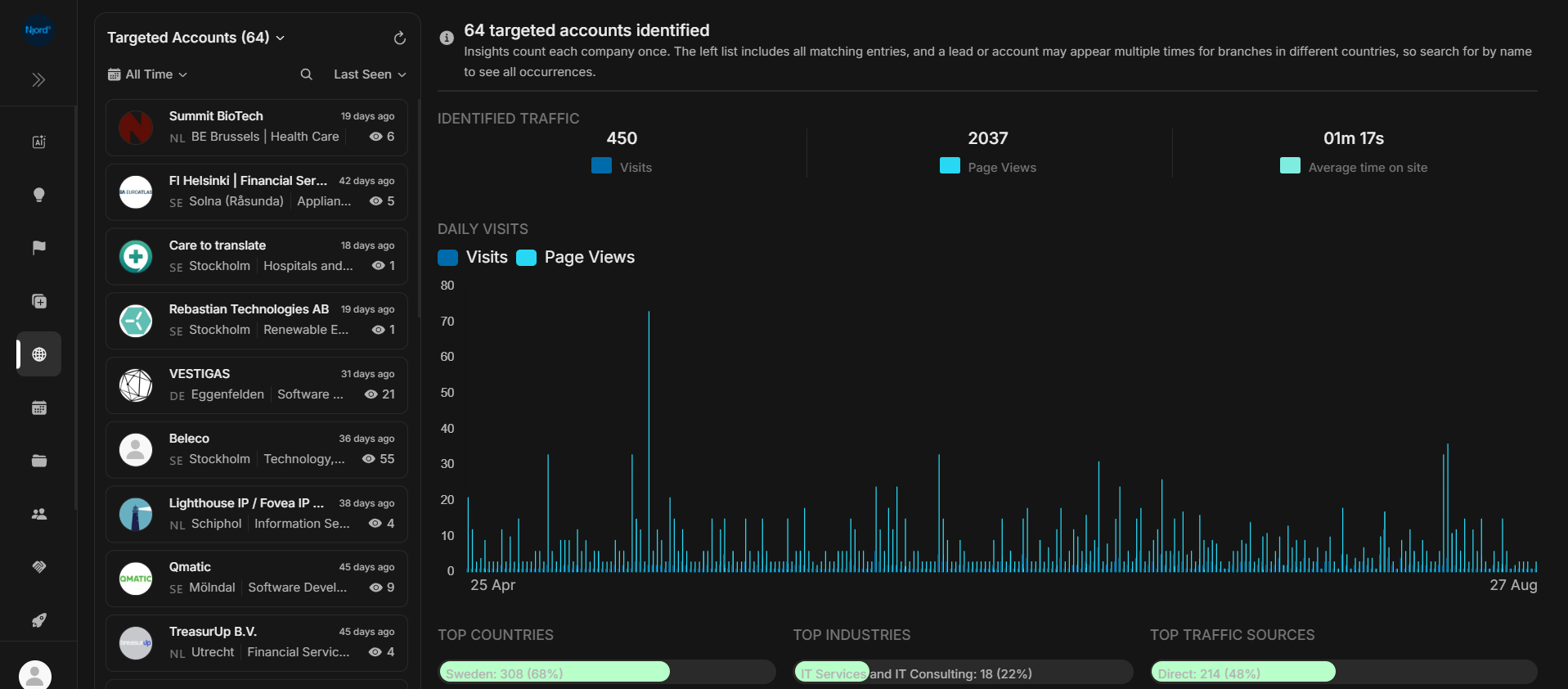
See which companies visit your website
Open Website to review identified company visits, see the pages viewed and check whether a visitor is already in your target list.
Website activity can identify a company without identifying the individual visitor. Use it as company-level context when deciding what to review next.
Image guide: the company list is on the left. The dashboard on the right summarizes identified visits and page activity for your selected period.
Review a visiting company
- Open Website and choose a date range.
- Choose All Accounts, Targeted Accounts or Non-Targeted Accounts.
- Search for a company or sort the list by Last Seen or Visits.
- Select a company to review its visits and page history.
Targeted Accounts are already included in targeting. Non-Targeted Accounts are identified visiting companies outside targeting. All Accounts combines the two.
Choose your next task
| What you need | Guide |
|---|---|
| Find a visitor or narrow the list | Account list and filters |
| Understand the overall activity chart | Identified traffic dashboard |
| See what one company viewed | Visit history and page paths |
| Decide whether a new company deserves review | Targeted and non-targeted visitors |
| Understand visits, page views and identification limits | Website metrics, dates and privacy |
Put a visit in context
Read the visit date and pages viewed alongside the company's profile and existing relationship with your team. Repeated visits can be useful to review, but a visit alone does not tell you who visited or why.
For activity across target companies, use Website Performance. For visiting companies outside your target list, use Non-targeted Website Performance.
If the list is empty
Check the account type, date range and search text. The dashboard shows identified company traffic; it is not a count of every anonymous visitor to your website.
See website metrics, dates and privacy when comparing with another analytics tool.