Visit history and page paths
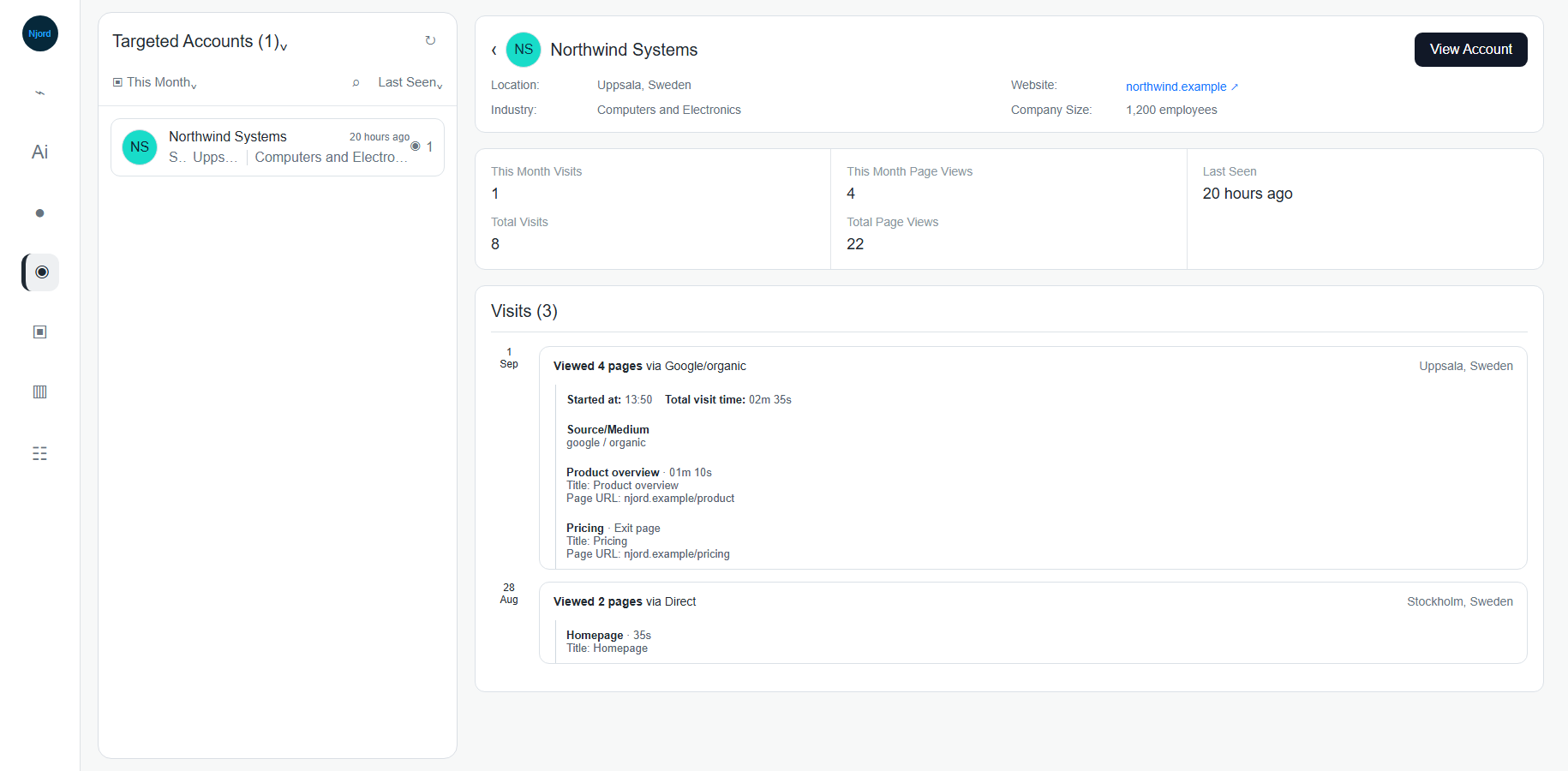
Visit history and page paths
Click a company in Website to open its visit history. This view helps you understand what one company did on the site before deciding whether the activity needs follow-up.
Where it sits in DOE: Website > select a company.
Image guide: the detail view shows company context, visit totals, last seen, source details, and the pages viewed during each visit.
Use This View To
| Need | How the view helps |
|---|---|
| Confirm whether activity is fresh | Review Last Seen and the visit timeline. |
| Understand depth of interest | Compare visits, page views, page depth, and time on page. |
| See what the company viewed | Expand page paths to see page title and URL. |
| Understand how the visit started | Expand source details for source, medium, and campaign when available. |
| Connect to account context | Use View Account for targeted companies. |
| Qualify a new visitor | Use Target Account only after fit and duplicate checks. |
Company Header
The top card shows company-level context:
| Field | Meaning |
|---|---|
| Company name | Company DOE identified from website activity. |
| Location | City and country when available. |
| Website | Company website link when available. |
| Industry | Matched industry when available. |
| Company size | Employee count when available. |
| Social links | LinkedIn or other social links when available. |
If the company is already targeted, DOE can show View Account. If the company is not targeted and your role allows it, DOE can show Target Account after confirmation.
Visit Stats
| Stat | Meaning |
|---|---|
| Selected-period visits | Visits inside the current date period, when the period is not All Time. |
| Total Visits | All known visits for that company. |
| Selected-period page views | Page views inside the current date period, when available. |
| Total Page Views | All known page views for that company. |
| Last Seen | Most recent tracked visit for the company. |
Use selected-period values for current prioritization. Use total values for history.
Visit Timeline
Each visit can show:
| Timeline item | Meaning |
|---|---|
| Device icon | Device type when available. |
| Visitor or stakeholder | Known stakeholder or visitor context when DOE has it. |
| Viewed page count | Number of unique pages in that visit. |
| Source | How the visit began, such as Direct, organic search, referral, or campaign source. |
| City/country | Location context when available. |
| Started at | Time the visit began. |
| Total visit time | Total tracked duration when available. |
Some visits identify only the company. That is still useful for account prioritization, but it does not prove which person visited.
Page Paths
Page paths show the pages viewed during a visit. Expand a page path when you need more detail.
| Page-path detail | Meaning |
|---|---|
| Display page name | Friendly page name when DOE has one. |
| Count | Shows repeated views of the same page. |
| Time on page | Time spent on the page when available. |
| Exit page | The last page in the visit. |
| Page title | Browser/page title captured for the page. |
| Page URL | The tracked URL, opened externally when available. |
How To Interpret Page Paths
| Pattern | Possible meaning |
|---|---|
| Product, pricing, demo, or contact pages | Stronger reason to review the account. |
| Case studies or comparison pages | Possible evaluation or research. |
| One homepage visit only | Light signal; check other evidence before action. |
| Repeated visits across several days | Growing interest or repeated research. |
| Many pages from a non-targeted company | Good reason to qualify fit, ownership, and duplicates. |
What To Do Next
- Confirm the latest visit is inside the period you care about.
- Check whether the company is targeted or non-targeted.
- Review source and campaign information if present.
- Look for high-intent pages.
- Compare the activity with stakeholder engagement, account status, and open deals.
- Add an internal note or route the account for review when the evidence is strong enough.
If Visit Detail Is Limited
| Missing detail | What it means | What to use instead |
|---|---|---|
| No person name | DOE identified the company but not the individual. | Company, pages, timing, and account context. |
| No campaign | The visit did not include campaign data or DOE did not receive it. | Source, medium, and page paths. |
| No time on page | Timing was unavailable or incomplete. | Page views, visit count, and recency. |
| No page URL/title | Page history was not recorded for that page. | Visit count, source, and reports. |