Non-targeted website performance
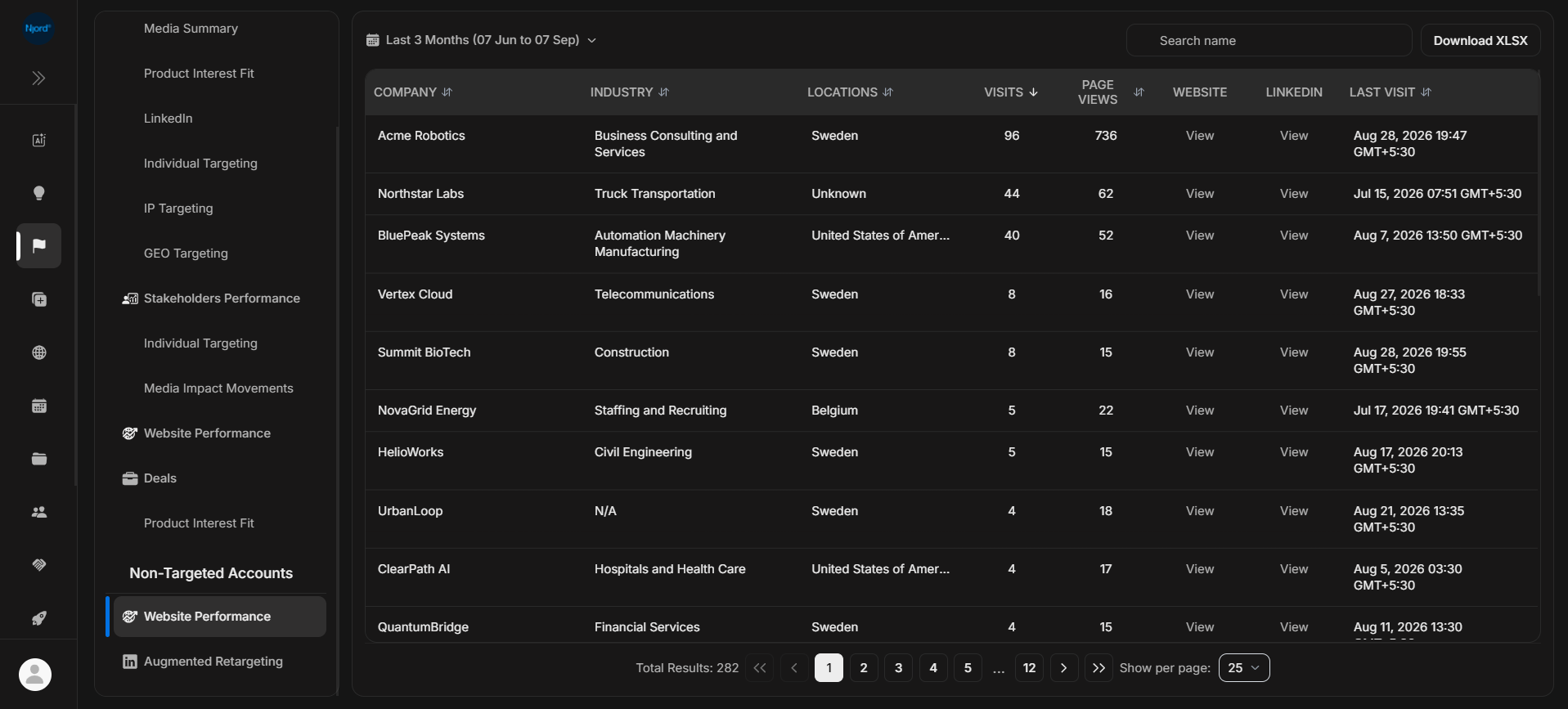
Non-targeted website performance
Non-targeted Website Performance shows companies that visited tracked website pages but are not currently target accounts. Use it to discover possible demand outside your target list.
Where it sits in DOE: Reports > Non-targeted accounts > Website Performance.
This report is for discovery and cleanup. A row here means DOE sees website activity from a company that is not currently matched as a target account.
Use This Report To
| Need | How this report helps |
|---|---|
| Find unknown website visitors | Review companies outside the current target list. |
| Check visit quality | Sort by visits, page views, or last visit. |
| Investigate fit | Use industry, location, website, and LinkedIn links for quick context. |
| Prepare retargeting review | Move promising companies into Augmented Retargeting review. |
Main Columns
| Column | What the column tells you |
|---|---|
| Company | Visitor company not currently matched as a target account. |
| Industry | Industry category where available. |
| Locations | Countries connected to the visits. |
| Visits | Number of visits in the selected period, or all-time visits when All time is selected. |
| Page Views | Number of tracked pages viewed. |
| Website | Opens the company's website when available. |
| Opens the company's LinkedIn page when available. | |
| Last Visit | Most recent tracked visit shown in the viewer's local time. |
Before You Treat A Company As A New Target
- Check whether it is already a target account under another name.
- Review the pages visited and the visit recency.
- Check the industry, location, website, and LinkedIn context.
- Compare with your target market and exclusion rules.
- Ask an admin or owner to confirm before changing targeting.
If It Does Not Look Right
Clear search and filters, then widen the duration. If a company disappears, it may have become targeted, been excluded, failed to match the current filters, or fallen outside the selected time window.