Website account list and filters
Website account list and filters
The Website account list is the left panel on the Website page. It helps you choose which identified company to review and narrow the list by type, time, name, freshness, or visit volume.
Where it sits in DOE: Website > left panel.
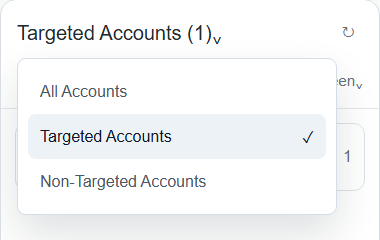
Image guide: use the account type menu to switch between All Accounts, Targeted Accounts, and Non-Targeted Accounts. The number beside the label reflects the current list scope.
Use This Panel To
| Need | How the panel helps |
|---|---|
| Review known target-account interest | Choose Targeted Accounts. |
| Find new companies outside targeting | Choose Non-Targeted Accounts. |
| See all identified company traffic | Choose All Accounts. |
| Focus on a specific company | Open search and type the company name. |
| Find recent visitors | Sort by Last Seen. |
| Find high-volume visitors | Sort by Visits. |
| Refresh the current list | Use the refresh icon after setup changes or recent activity checks. |
Account Type
| Option | What it shows |
|---|---|
| All Accounts | Identified website traffic across targeted and non-targeted companies. |
| Targeted Accounts | Companies already matched to target accounts. |
| Non-Targeted Accounts | Identified companies that are not currently target accounts. |
Use All Accounts when you need the broadest picture. Use Targeted Accounts for sales prioritization. Use Non-Targeted Accounts for discovery and targeting cleanup.
Date Period
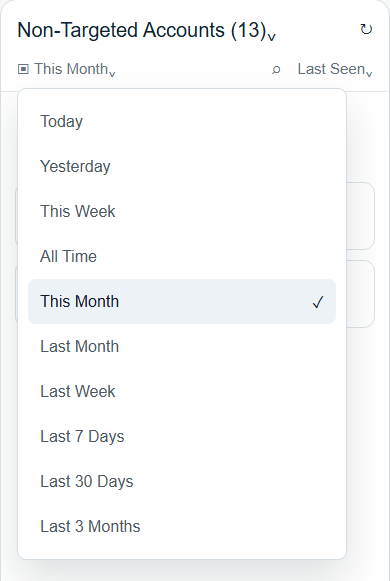
Image guide: the date menu controls both the list and the summary on the right. Change it before comparing visit counts.
| Period | Use it when |
|---|---|
| Today | You are checking same-day activity. |
| Yesterday | You need the previous day's visitors. |
| This Week | You want the current week without older traffic. |
| Last Week | You are reviewing the previous completed week. |
| This Month | You want current-month activity. |
| Last Month | You are reporting on the previous completed month. |
| Last 7 Days | You need a rolling recent view. |
| Last 30 Days | You need a rolling month-like view. |
| Last 3 Months | You want a broader campaign or account-interest window. |
| All Time | You want lifetime website history available in DOE. |
Website periods are meant for website activity review. When you compare with a report, confirm whether that report uses the same period and timezone logic.
Search, Sort, And Refresh
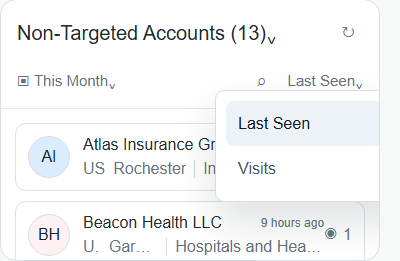
Image guide: sort by Last Seen when recent activity matters, or by Visits when you want the busiest companies first.
| Control | What it does | When to use it |
|---|---|---|
| Search | Filters the list by company name. | Checking one company or duplicate-looking names. |
| Last Seen sort | Puts recently active companies first. | Daily review, sales follow-up, or signal triage. |
| Visits sort | Puts companies with more visits first. | Demand review, campaign analysis, or prioritization. |
| Refresh | Reloads the current list and summary. | Recent tracking changes or after switching context. |
When You Arrive From Account Details
Opening Website from an account can limit the left list to that account. Use the clear-filter action beside Refresh to return to the full account list. Clearing this link-based filter keeps the current company open in the detail panel, so you do not lose the visit you were reviewing.
What Each Company Row Shows
| Row item | Meaning |
|---|---|
| Company name | The company DOE identified from website activity. |
| Logo | Company logo when available; a default icon appears when missing. |
| Location | City/country context when available. |
| Industry | Company industry where DOE has a match. |
| Targeted marker | Shows when a company in a combined view is already matched as a target account. |
| Eye/visit count | Visit count for the selected period or all-time context shown by the view. |
| Last seen time | How recently DOE saw activity for that company. |
Why Counts Can Look Different
The left list may include multiple entries for the same company when DOE has separate branches, countries, or matching records. The Identified Traffic summary counts each company once where possible. Use search when you need to see all entries for one company name.
If The List Looks Wrong
| Symptom | What to check |
|---|---|
| No rows appear | Clear search, widen the period, or change account type. |
| A company is missing | Try All Accounts, then check targeted versus non-targeted scope. |
| Too many rows appear | Search by name or narrow the date period. |
| Duplicate-looking rows | Compare location, country, industry, and target status. |
| Numbers changed after refresh | Website data may have updated or filters changed. |