Explore a stakeholder's details
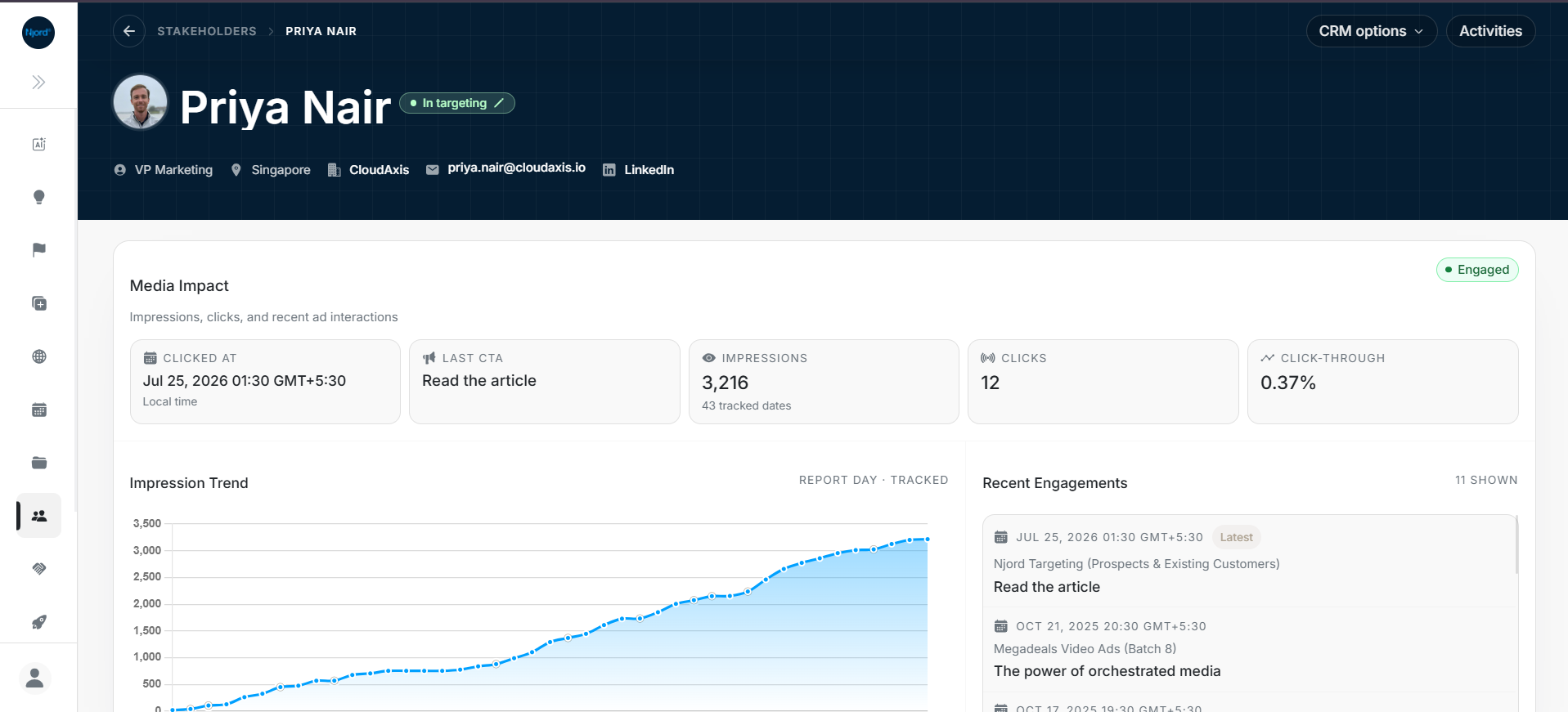
Explore a stakeholder's details
Stakeholder Details brings together one person's profile, linked company, advertising activity, events and deals. Open Stakeholders, then select the person's name.
Image guide: the header identifies the person and their company. The first card summarizes media impact, recent engagement and impressions.
Prepare for a conversation
- Confirm the person's name, position and linked account.
- Review their recent engagement.
- Check related meetings, notes and deals.
- Open the linked account when you need the broader company picture.
Find the information you need
| Question | Guide |
|---|---|
| What does the overview show? | Stakeholder details overview |
| Where are the person's profile and company details? | Profile and linked account |
| Have they seen or interacted with advertising? | Media impact and engagements |
| Are they included in targeting? | Ad Targeting |
| What meetings or deals are connected? | Events and Deals |
| What changed on this record? | Activities |
Move between a person and their company
Use Go to Account in Linked Account to review the company record. The person's activity and the company's totals can differ because they measure different things.
If you need to compare several people, return to the Stakeholders list or open Stakeholder Individual Targeting in Reports.
Correct a record
Use the available profile edit controls after confirming the person and linked account. For changes across several people, follow inline and bulk updates.
To check a previous change, open Activities and narrow the date or activity type.