Stakeholder media impact and engagements
Stakeholder media impact and engagements
Media Impact shows person-level engagement evidence. Use it to understand whether the stakeholder has been reached, aware, or engaged before planning follow-up.
Media Impact panel
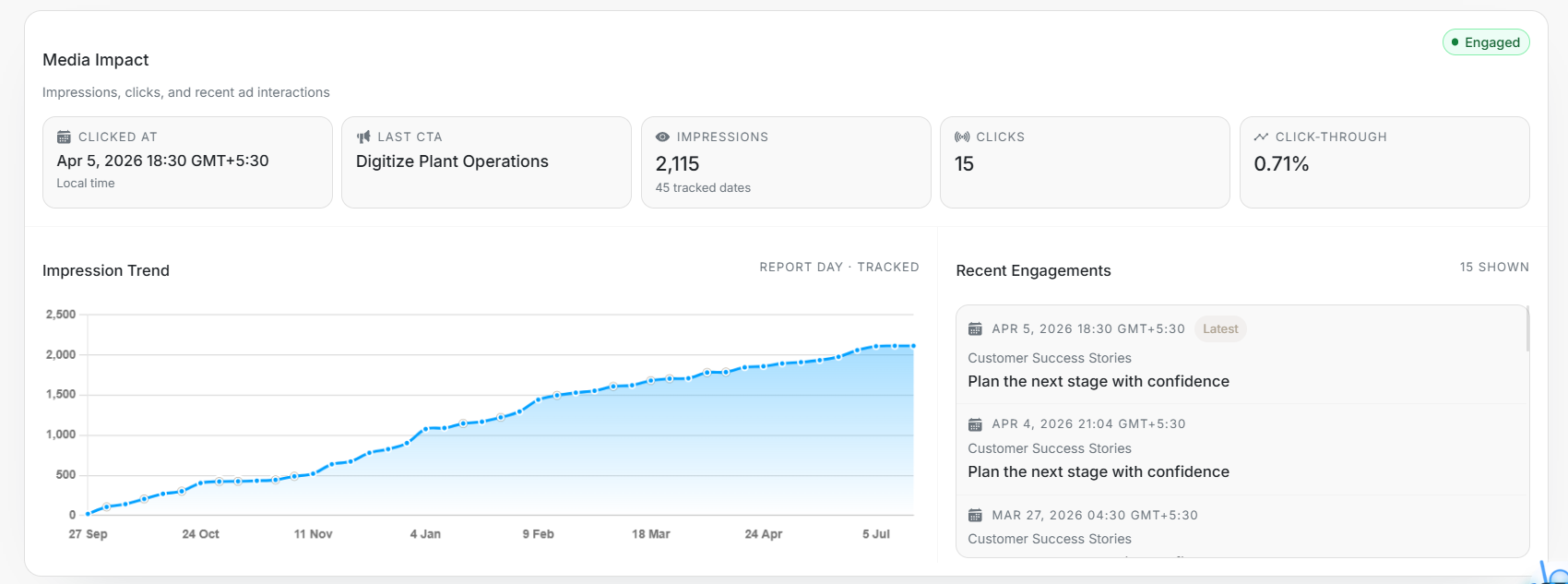
Image guide: This screenshot belongs to Media Impact. It shows clicked date, last CTA, impressions, clicks, click-through, impression trend, and recent engagements.
What to check
| Metric | Meaning |
|---|---|
| Clicked At | Latest tracked click date and time. |
| Last CTA | Most recent call to action clicked. |
| Impressions | Total tracked ad impressions. |
| Clicks | Total tracked ad clicks. |
| Click-through | Clicks divided by impressions where available. |
| Recent Engagements | Latest tracked interactions and content context. |
Why Recent Engagements may show fewer rows than Clicks
Clicks is the total tracked ad-click count. Recent Engagements shows one entry per distinct last-click date and time in the available engagement records, newest first. Repeated records with the same timestamp are shown once; different timestamps on the same day stay separate. There is no fixed row limit.
This is not a list of every individual click, so the number of entries can be lower than the Clicks total. If detailed engagement records are unavailable, DOE can show the stakeholder's latest known click instead.
How to use the evidence
Use Media Impact before outreach, before changing targeting, and before comparing this stakeholder with others in the same account. Recent engagements can explain what content or CTA the person responded to.