Explore a deal's details
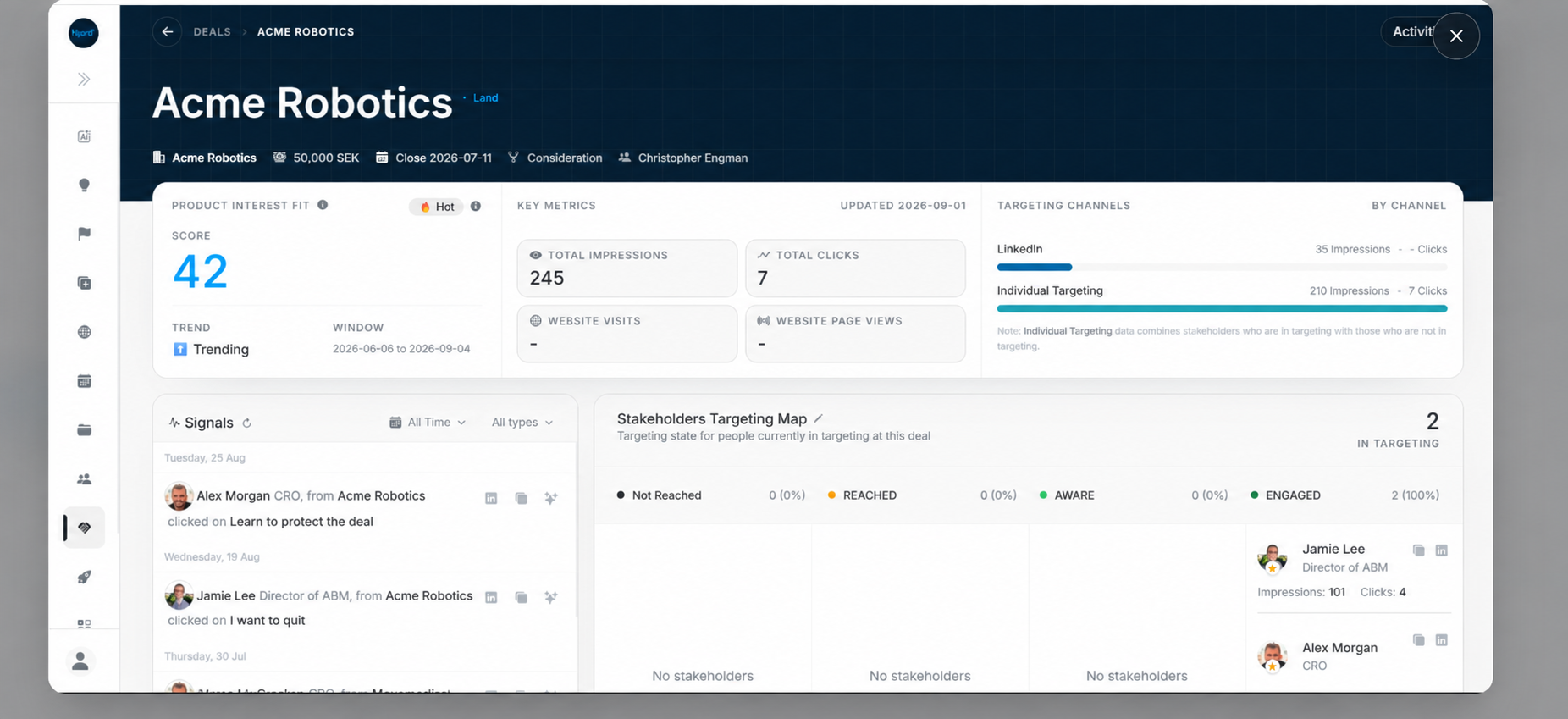
Explore a deal's details
Deal Details brings together one opportunity's forecast, people, activity and checklist. Open a deal from Land, Expand or its linked account.
Image guide: the header identifies the deal and account. The overview combines Product Interest Fit, key metrics and targeting activity.
Review an opportunity
- Confirm the account, deal owner and current stage.
- Check the value, probability and expected close date.
- Review signals and the people connected to the deal.
- Read recent events and the sales checklist before agreeing on the next action.
Find the information you need
| Question | Guide |
|---|---|
| What do the deal fields and headline metrics mean? | Deal details overview |
| Which recent activity or advertising is relevant? | Signals and ad preview |
| Who is involved, and what checklist work remains? | Stakeholder maps and checklist |
| What meetings, notes or record changes are connected? | Events and activities |
| How do I add or review people on the deal? | Manage stakeholders |
| How do I update deal fields? | Inline and bulk updates |
Understand the two stakeholder views
Deal Stakeholders contains people assigned to this opportunity. Account Stakeholders contains people from the linked company, including people who may not yet be assigned to the deal.
Use the Manage Stakeholders guide when checking the buying group or adding someone to an opportunity.
Check the wider context
Open the linked account for company-wide activity or a stakeholder for one person's details.
Return to Quick Win when you want to compare the deal's close timing and probability with other opportunities.