Stakeholder list and summary cards

Stakeholder list and summary cards
The Stakeholders list is the fastest place to scan people in your workspace. Use it to compare media impact, find a person, and open the full stakeholder record.
The card row summarizes stakeholder media impact across the current workspace view.
What The Summary Cards Show
| Card | What it represents |
|---|---|
| Engaged | People with stronger tracked engagement evidence. |
| Aware | People with meaningful impression evidence. |
| Reached | People with basic reach evidence. |
| Not Reached | People without visible reach evidence. |
| Total Stakeholders | All stakeholders visible in the current workspace. |
Clicking a media-impact card can narrow the list to stakeholders in that state when the product view supports card filtering.
How To Read The Table
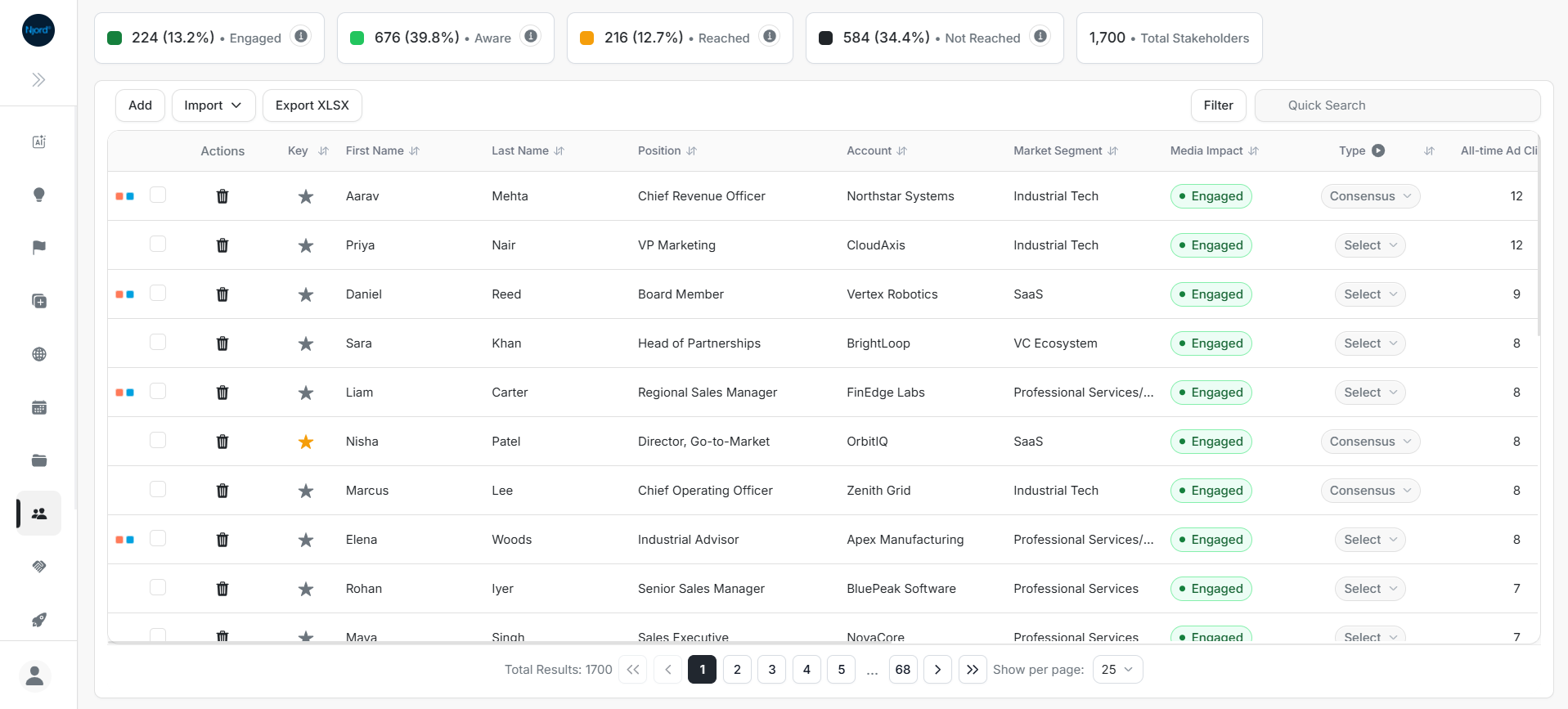
The table combines person identity, account context, media impact, targeting, contact actions, and sortable media metrics.
| Column | Use it for |
|---|---|
| Key | See whether the stakeholder is marked important. |
| First Name / Last Name | Confirm the right person. |
| Position | Understand role and seniority. |
| Account | Confirm the linked company. |
| Market Segment | Compare stakeholders by account segment. |
| Media Impact | Prioritize people by engagement evidence. |
| Type | Track stakeholder role in the buying process. |
| All-time Ad Clicks | Rank stakeholders by click activity. |
| All-time Ad Impressions | Compare total reach volume. |
| Last click report day | See when the latest click was recorded. |
| Last Ad CTA Clicked | See the content or CTA that received a click. |
| Media Updated | Check freshness of media data. |
| Ad Targeting | See or update targeting inclusion. |
| Email / LinkedIn | Copy or open contact/profile details. |
| Location | Check country or region. |
Horizontal scrolling is expected on this wide table. If a column is not visible, scroll the table before assuming the field is missing.
Useful Review Patterns
- Sort by All-time Ad Clicks for the most responsive stakeholders.
- Sort by All-time Ad Impressions for the most exposed stakeholders.
- Combine Media Impact, Type, Position, and Account before deciding outreach.
- Open the stakeholder detail page before making a CRM or targeting change.