Change ad targeting for deal contacts
Change ad targeting for deal contacts
Targeting for a Deal person comes from their active stakeholder Audience memberships. Assigning a person to an opportunity does not by itself turn advertising on.
Edit one person's memberships
- Find the person in Manage Stakeholders.
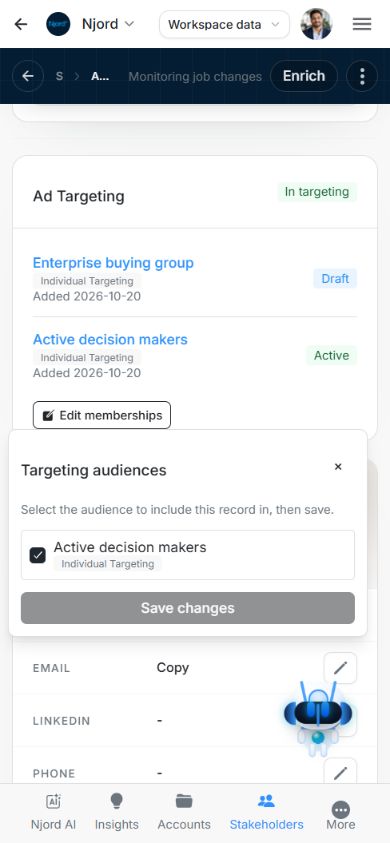
- Where the Ad Targeting checkbox is offered, choose it to open Targeting audiences. It opens a membership editor rather than instantly flipping targeting.
- Review the existing checked Audiences. Select the active stakeholder Audiences that should include the person and clear any membership you intend to remove.
- Choose Save changes and follow the separate Audience operations. Keep the editor open while changes are pending.
- Check the refreshed targeting state after completion. Use the displayed retry action for a failed Audience update.
The picker offers active Audiences of the matching record type. If none are available, create and activate a stakeholder Audience first. Stakeholder Audiences use Individual Targeting. An account Audience's LinkedIn/IP/GEO settings are a separate configuration.
Use a person's full profile when needed
On narrower screens an expanded Deal card may show contact and result fields without the targeting editor. Open the person's full profile and use Edit memberships in its targeting area. Do not treat a missing compact-card checkbox as an instruction to recreate the person.
Review overlapping memberships
Clearing one Audience does not turn targeting off when another active stakeholder Audience still includes the person. To remove memberships, uncheck the individual audiences and review the exclusions before choosing Save changes.
For multiple people use the targeting action for selected stakeholder records, review both the people and Audience names, and track each result. Targeting Map refreshes from the resulting targeting state; Traffic Light stance and Deal association remain separate.