Switch between Land and Expand
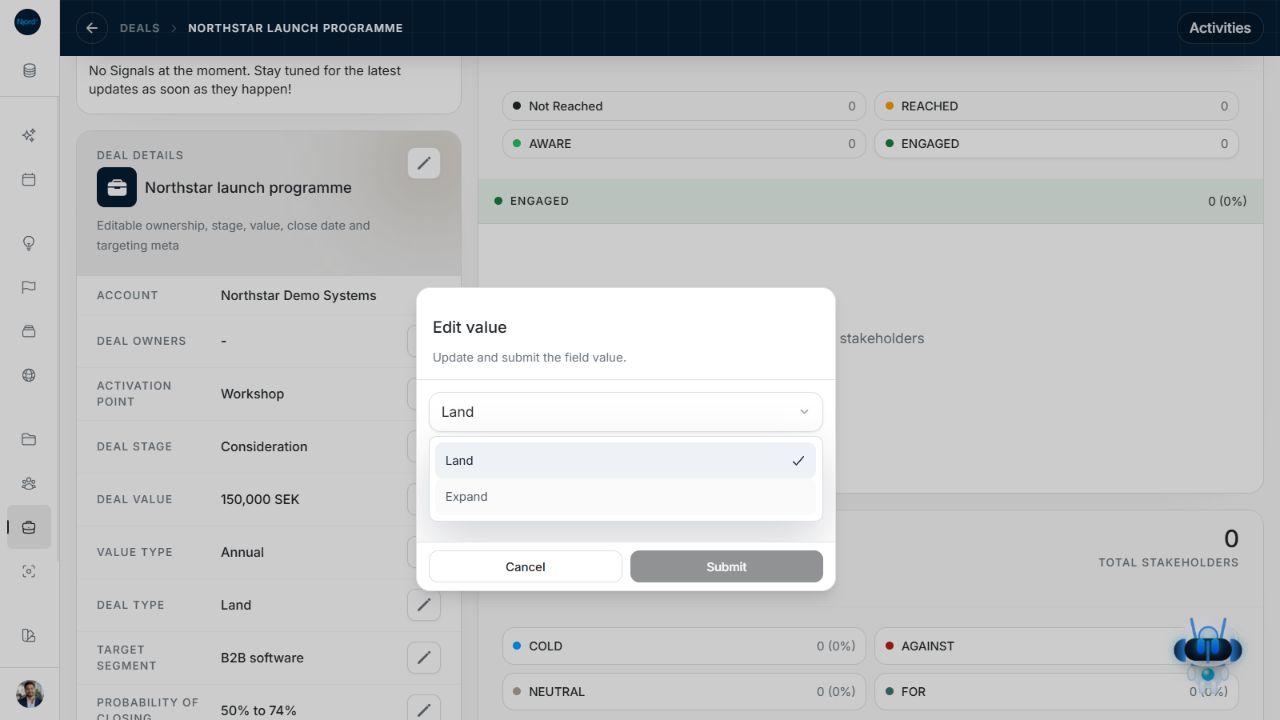
Switch between Land and Expand
Use Deal Type when a Deal belongs in the other sales programme. Land and Expand describe the programme; the Deal Stage describes progress within it.
Where to find it: open a Deal, then Deal details > Deal Type. You need permission to manage records.
Image guide: Deal Type editor offering Land and Expand while the existing Northstar Deal remains visible. Shown in light theme.
Change the programme
- Choose the pencil beside Deal Type.
- Open the current value and choose Land or Expand.
- Choose Submit and check the saved type in the card and header. Cancel keeps the original type.
The saved change moves the detail page to the route matching the Deal's programme. Existing navigation context is retained so the breadcrumb remains useful.
Review the stage separately
Changing type updates the programme. It does not automatically choose a new stage or reset owners, value or checklist progress. Reopen Deal Stage after saving and choose the appropriate available stage for the new programme when needed. Review its change date separately from the estimate close date.
Return to the Deals view and review your filters if the Deal no longer appears in a programme-specific result. Its absence from a Land-only or Expand-only view is not evidence that it was deleted.