Account Details overview
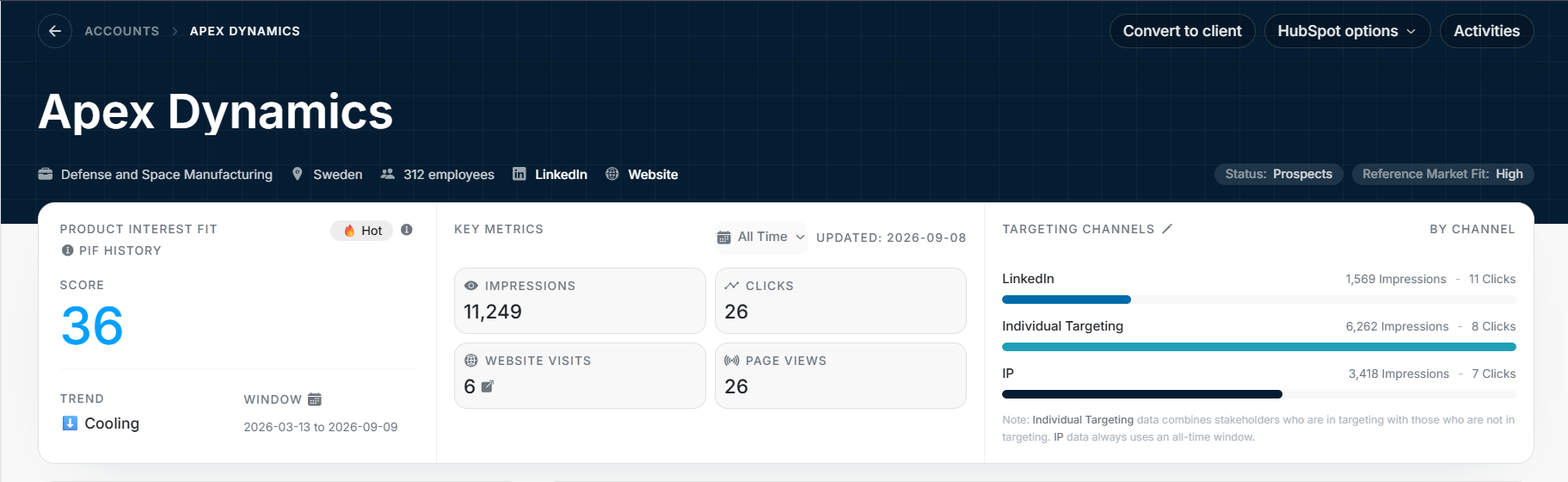
Account Details overview
The Account Details overview summarizes one company before you inspect deeper sections. It combines identity, status, Product Interest Fit, key metrics, and targeting channel activity.
Header
| Element | What it tells you |
|---|---|
| Account name | The company record you are reviewing. |
| Industry | Business category used for context and filters. |
| Country | Headquarters or primary country context. |
| Employees | Company size context when available. |
| LinkedIn and Website | External links for review. |
| Status | Current account lifecycle state. |
| Reference Market Fit | Fit value used for prioritization. |
The header actions can include Convert to client, Connect to HubSpot, and Activities. Availability depends on permissions, account state, and connected integrations.
Product Interest Fit
Product Interest Fit helps prioritize the account. Read it with the account's recent activity rather than as a standalone verdict.
| Field | Meaning |
|---|---|
| PIF Band | Label such as Hot or Warm. |
| PIF Score | Numeric fit and interest score. |
| Trend | Direction such as Trending, Holding, or Cooling. |
| Window | Date range used for the current score context. |
Key Metrics
Key Metrics show account-level performance for the selected period.
| Metric | Meaning |
|---|---|
| Impressions | Account-level media reach volume. |
| Clicks | Account-level click activity. |
| Website Visits | Matched website visits when tracking data exists. |
| Page Views | Tracked page views tied to those visits. |
The date control changes the period. The updated date gives context for data freshness.
Targeting Channels
Targeting Channels compares activity across channels such as LinkedIn and Individual Targeting. Each row can show impressions, clicks, and a proportional bar.
Use the channel rows to understand where the activity came from before deciding whether an account needs owner review, targeting changes, or no action.