Stakeholder profile and linked account
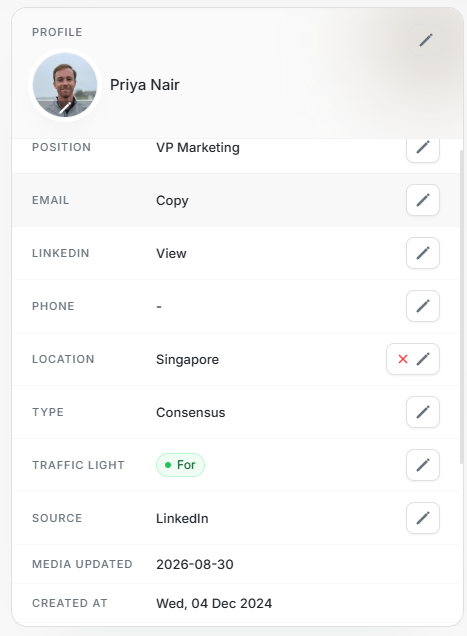
Stakeholder profile and linked account
Profile explains the person record. Linked Account explains the company context behind that person.
Use these cards to verify identity, contact details, role, source, and company before making outreach or targeting decisions.
Profile Fields
| Field | Meaning |
|---|---|
| Name | Stakeholder display name. |
| Position | Job title or role. |
| Copy action when an email is available. | |
| View action when a profile URL is available. | |
| Phone | Phone number when known. |
| Location | Country or region. |
| Type | Buying-committee role. |
| Traffic Light | Relationship stance such as For when used. |
| Source | Origin of the stakeholder record. |
| Media Updated | Latest media-data update date. |
| Created At | Stakeholder creation date. |
| Updated At | Latest stakeholder update date. |
Field edit controls appear only where the user and record state allow editing.
Linked Account Fields
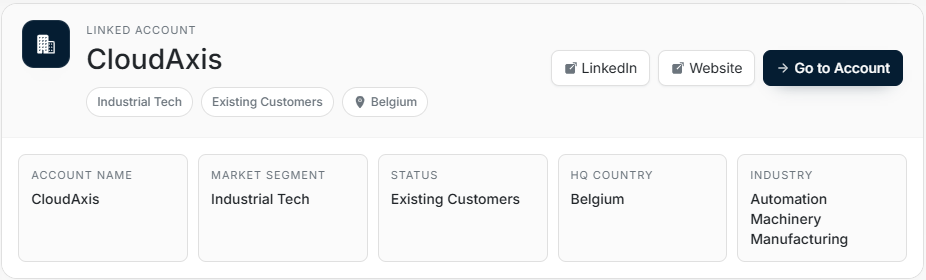
| Field | Meaning |
|---|---|
| Account Name | Company connected to the stakeholder. |
| Market Segment | Segment assigned to the account. |
| Status | Account lifecycle state. |
| HQ Country | Account headquarters country. |
| Industry | Account industry or category. |
| Opens the account LinkedIn page when present. | |
| Website | Opens the account website when present. |
| Go to Account | Opens the account details page in DOE. |
Safe Editing
- Confirm the linked account before editing person fields.
- Use Profile edits for stakeholder data only.
- Use Go to Account for company-level changes.
- Do not use a stakeholder edit to correct account metadata.