Editable account fields
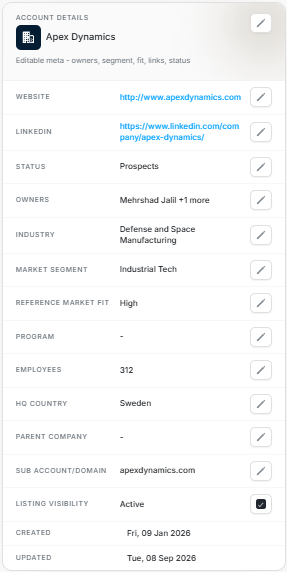
Editable account fields
The Account Details card is the account metadata panel. Use it to review and edit firmographics, ownership, links, status, fit, and operational fields.
Fields You Can Review
| Field | Use it for |
|---|---|
| Website | Company website used for review and matching context. |
| Company LinkedIn page. | |
| Status | Account lifecycle state. |
| Owners | Workspace users responsible for the account. |
| Industry | Firmographic category. |
| Market Segment | Segment used in filters and reporting. |
| Reference Market Fit | Fit value such as High, Medium, Low, or blank. |
| Program | Commercial program or motion. |
| Employees | Company size context. |
| HQ Country | Headquarters country. |
| Parent Company | Parent organization when known. |
| Sub Account/Domain | Account subdivision or domain context. |
| Created | When the record was created. |
| Updated | When the record was last updated. |
Editing Rules
Use the pencil control beside a field to edit that field when your permission allows it. Some fields are specific to a page or integration, or hidden for certain account states.
For example, Reference Market Fit may not be editable for every status. Created and Updated are audit fields and are normally read-only.
Before Editing
- Confirm you opened the right account.
- Check whether the field is sourced manually, from import, or from CRM.
- Avoid changing fields only to match a temporary view filter.
- Use Activities after editing if you need to confirm the change history.
Common Issues
| Symptom | What it usually means |
|---|---|
| Pencil is missing | You may not have permission or the field is read-only. |
| Dropdown has no option | The value may not exist in the workspace option set. |
| CRM value differs | CRM sync or mapping may control the source field. |
| Field shows a dash | The value is blank, unknown, or not applicable. |