Review CRM matches and sync failures
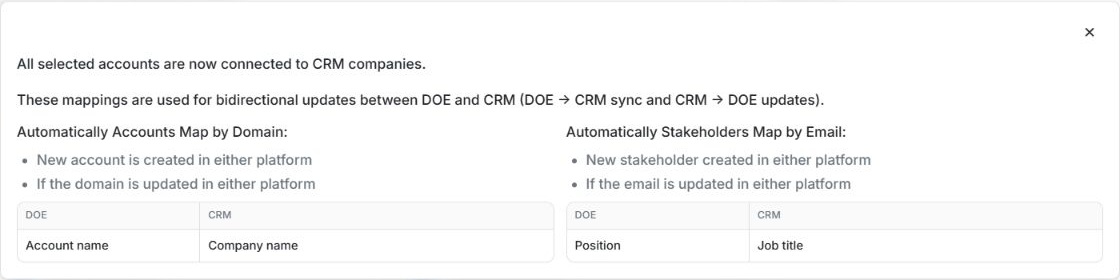
Review CRM matches and sync failures
For Client Admins: start in Settings → Integrations → Details for the workspace connection. Members can use the available CRM actions on an account or stakeholder to review individual record connections. Ask a Client Admin to review the integration-wide sync failures.
| What you see | What to do |
|---|---|
| Already mapped in an import list | Open View in HubSpot or View in Salesforce when available to check the existing CRM record. That row can be unavailable for selection while its link still works. |
| Wrong company linked to a DOE account | Open the account's CRM actions and review the current company. Follow the available disconnect or connect flow to correct the link. |
| Accounts Sync Failures or Stakeholders Sync Failures | Open the failure details and read each reason. Check the linked DOE record and whether other rows succeeded before retrying. |
| Re-auth required | Reconnect the right provider account. Return to DOE and verify the connection status. |
| Setup or mapping needs attention | Open connection details and review the mapping and field setup. If you manage the integration, use the mapping or sync action shown there. |
An individual record link and the whole workspace connection are separate. Use the record's CRM controls to fix a match. Use Settings to review provider access, sync or setup. For example, if the fictional HelioWorks Manufacturing account is linked to its parent company in the CRM, check both company websites before changing the match.
- HubSpot connection and mapping guides
- Salesforce connection and mapping guides
- Find and reconnect apps
Read the failure table
DOE RECORD identifies the account or stakeholder. REASON explains why that row failed. LINK opens the available record link; a dash means no link was supplied. Read account and stakeholder failures separately. A failed row does not mean every row failed.
For a duplicate company domain, compare the company websites and review the account connection. For a duplicate contact email, review the matching contacts in the CRM before retrying. Close the failure window to return to the connection details and compare the mapped and synced counts.
Screen examples
These light-mode examples use fictional local data. Your names, amounts, dates and connection state can differ.

