Update Segments for several accounts
Update Segments for several accounts
Use Update Segments when several companies need the same Segment and Offering added or removed. Filter first if it helps you find them, then select the specific rows you want to change.
Open the shared checklist
- In Accounts, find or filter the intended companies.
- Check their rows, up to 100 accounts per update. Read the selected count.
- Choose Update → GTM relationships → Update Segments →.
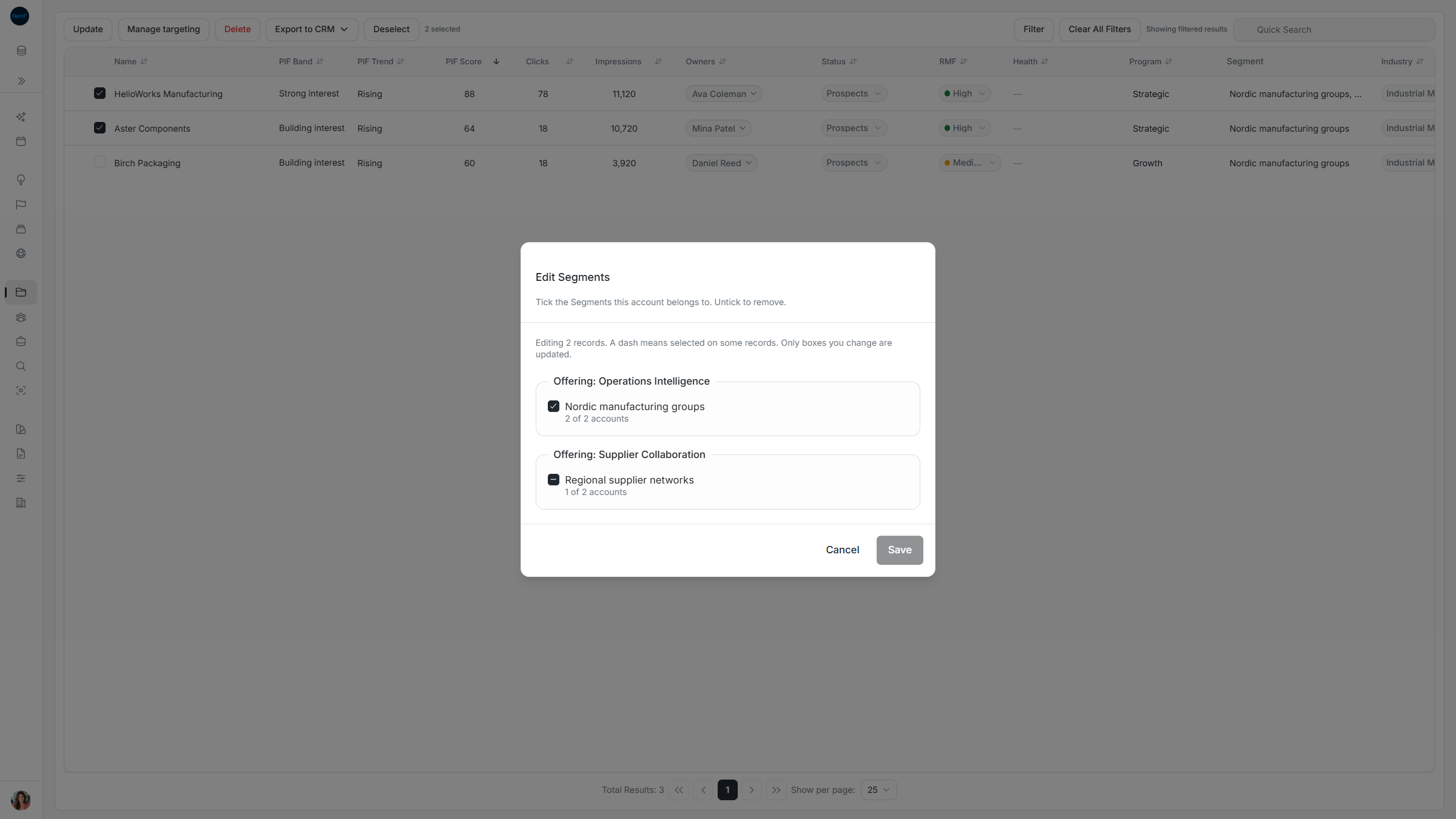
- Read each Offering heading, Segment name and account count before changing a box.
Understand the three checkbox states
| State before editing | Meaning | What to do |
|---|---|---|
| Checked | Every selected company has this Offering and Segment relationship. | Leave it checked to keep it; uncheck only to remove it from the selected companies. |
| Empty | None of the selected companies has it. | Check it to add it across the selection. |
| Dash or mixed | Some selected companies have it. | Leave the dash in place to keep the existing assignments. Click once to add it to all selected companies. Click again to make the box empty and remove it from all selected companies. |
In the example, HelioWorks and Aster both belong to Nordic manufacturing groups. Regional supplier networks shows 1 of 2 accounts because only HelioWorks has it. Leave the dash in place to keep that assignment on HelioWorks alone.
Save and verify
Choose Save, review any removal confirmation and use Save changes only when the removals are intended. Check the refreshed company rows or profiles. Searching the choices changes which definitions you see, not which accounts you selected.
Split a selection above 100 into smaller updates. If summaries cannot load, use Retry before saving. If some changes saved and others failed, inspect the retained choices and retry the remaining work; successful groups are already saved. Cancel before a save leaves the companies unchanged.
Segment assignments and audience memberships have separate controls. Use Manage targeting for audiences. Use each account’s Segment row to choose its optional Buying Logics.