Answer an AI questionnaire
Answer an AI questionnaire
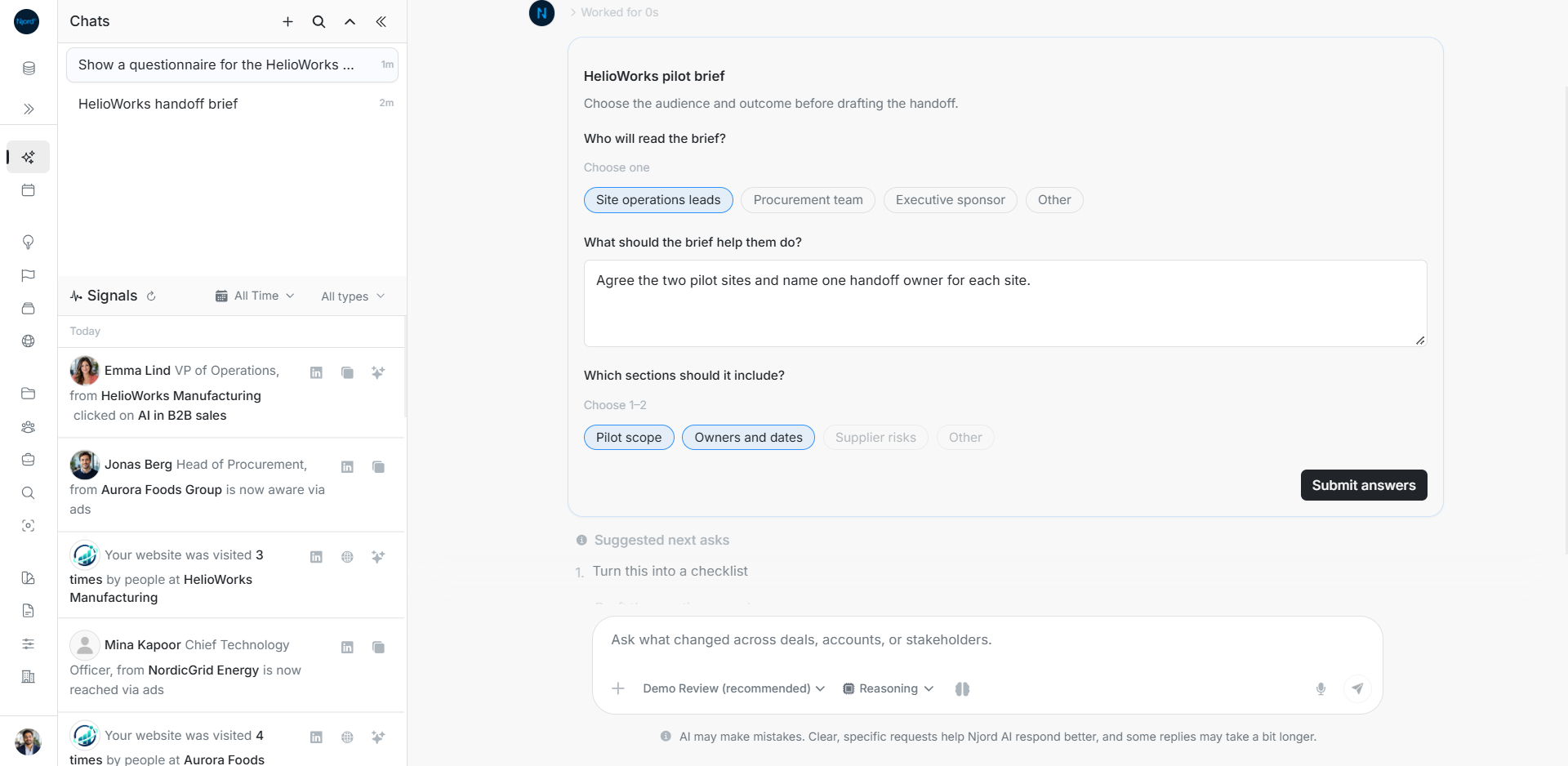
A questionnaire lets Njord AI ask for the choices it needs before drafting. Ask for one when the audience, scope or intended output needs agreement first.
Ask for the questions first
Try: “Prepare a pilot handoff brief. Before drafting it, ask me who will read it, what decision they need to make and which sections to include.” Wait for Preparing questions to finish. The complete form replaces that waiting state.
Fill the form
- Read every question before submitting.
- Complete the required text fields.
- Follow each choice limit. Choose one allows one answer; Choose 1–2 allows one or two.
- Select Other and enter its detail when the offered choices do not fit.
- Check that the form expresses your intended brief, then choose Submit answers once.
The example asks the assistant to prepare a brief for site operations leads, agree the two pilot sites and identify a handoff owner for each. Pilot scope and Owners and dates use the two permitted section choices.
Read what happens after Submit
The form locks after the send is accepted and the assistant continues with the supplied answers. Check the resulting brief against them. A later answer failure does not undo an accepted submission.
Only the latest unanswered questionnaire is interactive. Sending another user message can make an older form read-only. Use a follow-up to change the brief once a form has already been accepted.
Recover an unavailable action
| What you see | What to check |
|---|---|
| Submit disabled | Complete required answers, meet choice limits and wait for pending work. |
| Send rejected | Correct the problem and retry. Your answers remain editable. |
| An older form is read-only | Find the latest unanswered questionnaire or send a follow-up. |
| Submitted form after reopening | The same browser can restore accepted answers. Do not submit a duplicate. |
| Form is not restored on another device | The browser's recovery copy is not a cross-device form history. Check the conversation. |
Reloading does not automatically send another set of answers.