Recover a Brand document review
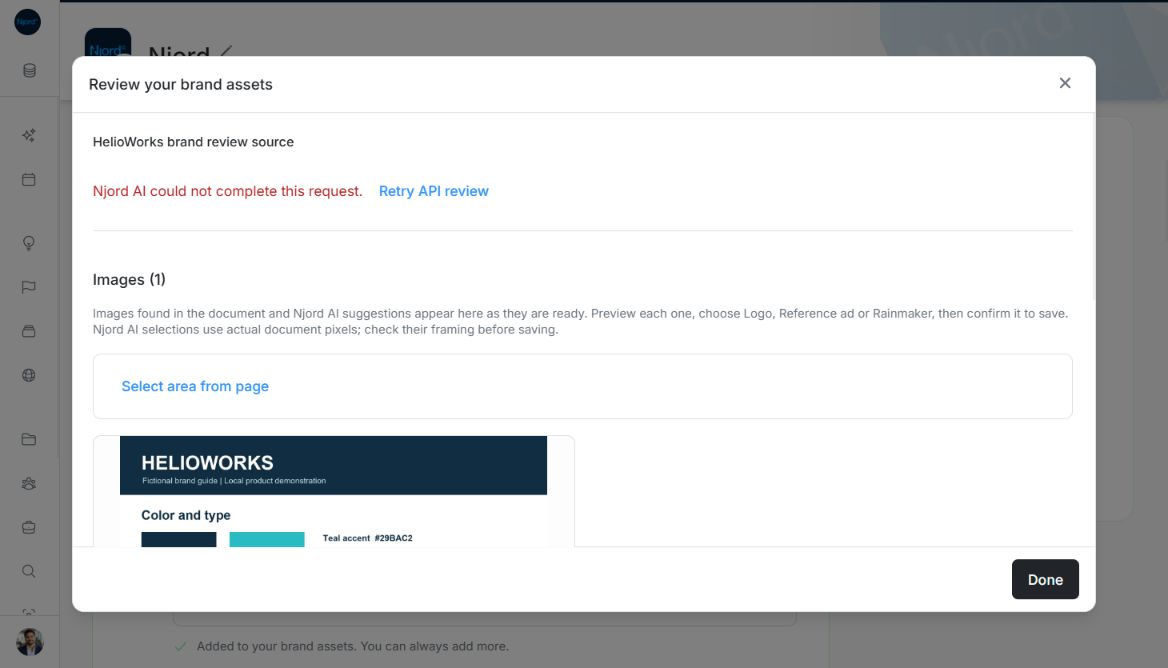
Recover a Brand document review
Brand stores a document separately from reviewing its contents. A saved file can be useful even when AI cannot read it, and a successful upload does not mean that derived colors, Fonts or images were approved.
Choose the right recovery
| Situation | Next step |
|---|---|
| Saved PDF or supported image, review not started | Use its sparkle action, add optional focus guidance, then Continue. |
| Review says the file is too large for AI | Keep the original; provide a smaller copy for AI. Local image extraction can remain available. |
| AI review fails but document images are available | Keep reviewing local images; use Retry API review when offered. |
| Password-protected PDF | Obtain an unlocked copy that the team is allowed to use. |
| No standalone image found in a vector or scanned PDF | Use Select area from page, inspect the resulting PNG, then confirm it. |
| One color, Font or image fails to save | Correct or retry that item; successful sibling items stay saved. |
| Unsupported review format | The file remains saved; upload a supported PDF or PNG/JPEG/WebP/GIF for review. |
Reading limits and stored files
AI review supports PDFs up to 10 MB and images within the product's displayed 7 MiB guidance. Stored file limits are separate. An oversized saved file can still offer local image extraction without sending it for AI review. Reducing a file's name or changing its extension does not reduce its bytes or convert its format.
Review before confirming
Check source evidence, exact color codes, font URLs and intended use. Add missing required descriptions before confirming Colors or Fonts. A visually estimated color is not an official code. Font URLs must come from the document; the review does not invent or fetch a missing font source.
Confirm each useful item separately. Invalid, pending or already saved items cannot be confirmed again. Closing the review discards unconfirmed suggestions and leaves saved approvals intact. Reopening or redoing extraction reads the latest document, so inspect new suggestions before saving possible duplicates.
Read partial local extraction results
PDF image scanning is bounded to 200 pages, 200 unique images, 128 MiB of encoded output and 16 million decoded pixels per image. Read the displayed notes about skipped artwork, unreadable pages or reached limits. A partial result does not establish that every page or embedded image was reviewed. Repeated artwork may be deduplicated. Use Select area from page for composed or vector artwork and inspect the resulting PNG before confirmation.
Image guide: When the fictional API review fails, Retry API review appears while Images (1) retains the locally extracted source pixels. Fictional local example in the normal authenticated product, shown in light theme.