Read audience performance
Read audience performance
Use Audience performance to see which members have been reached or engaged. Read each technique separately because their measurement periods differ.
Read the summary
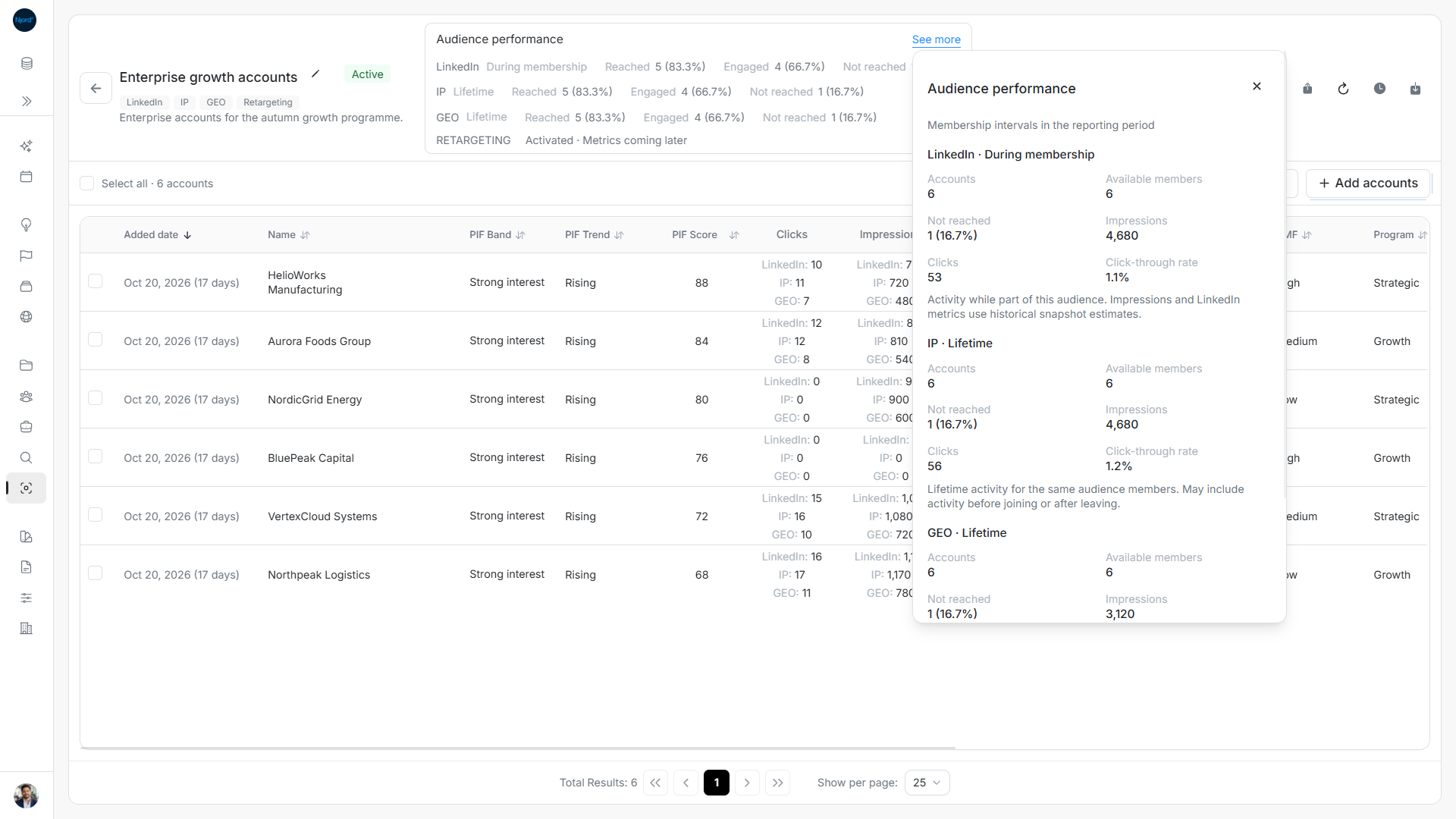
Catalog cards show Reached and Engaged with counts and percentages. Audience details also show Not reached. Open the card information control or See more for member counts, available members, impressions, clicks, CTR and notes.
| Technique | Basis |
|---|---|
| During membership; historical snapshot estimates within saved intervals. | |
| Individual Targeting | During membership; recorded clicks and estimated impressions within saved intervals. |
| IP and GEO | Lifetime activity for the historical member group, possibly before joining or after leaving. |
| Retargeting | Activated or Not active; delivery metrics are not available yet. |
Only configured account techniques appear. A configured technique on a Draft or Inactive audience does not prove current delivery. Do not combine lifetime and during-membership reach into one score. These are observed results rather than proof that one audience caused an engagement.
Image guide: See more explains the LinkedIn membership period and the IP lifetime period.
Filter the current members
- Select Reached, Engaged or Not reached for a technique.
- Check its highlighted state and the matching-member count.
- Inspect the current roster. Ordinary account or stakeholder filters also apply.
- Choose the same metric again, or clear filters, to remove the restriction.
The roster contains current members only, including after a performance filter. Historical members remain part of summary calculations, so the summary can exceed the roster count. Rejoined entities appear once with the current Added date; metrics can cover eligible earlier intervals.
With one technique selected, the table shows its values and metric sorting uses that technique. Changing the performance filter resets page, sort and selection. There is one membership-based performance view and no separate mode switch.
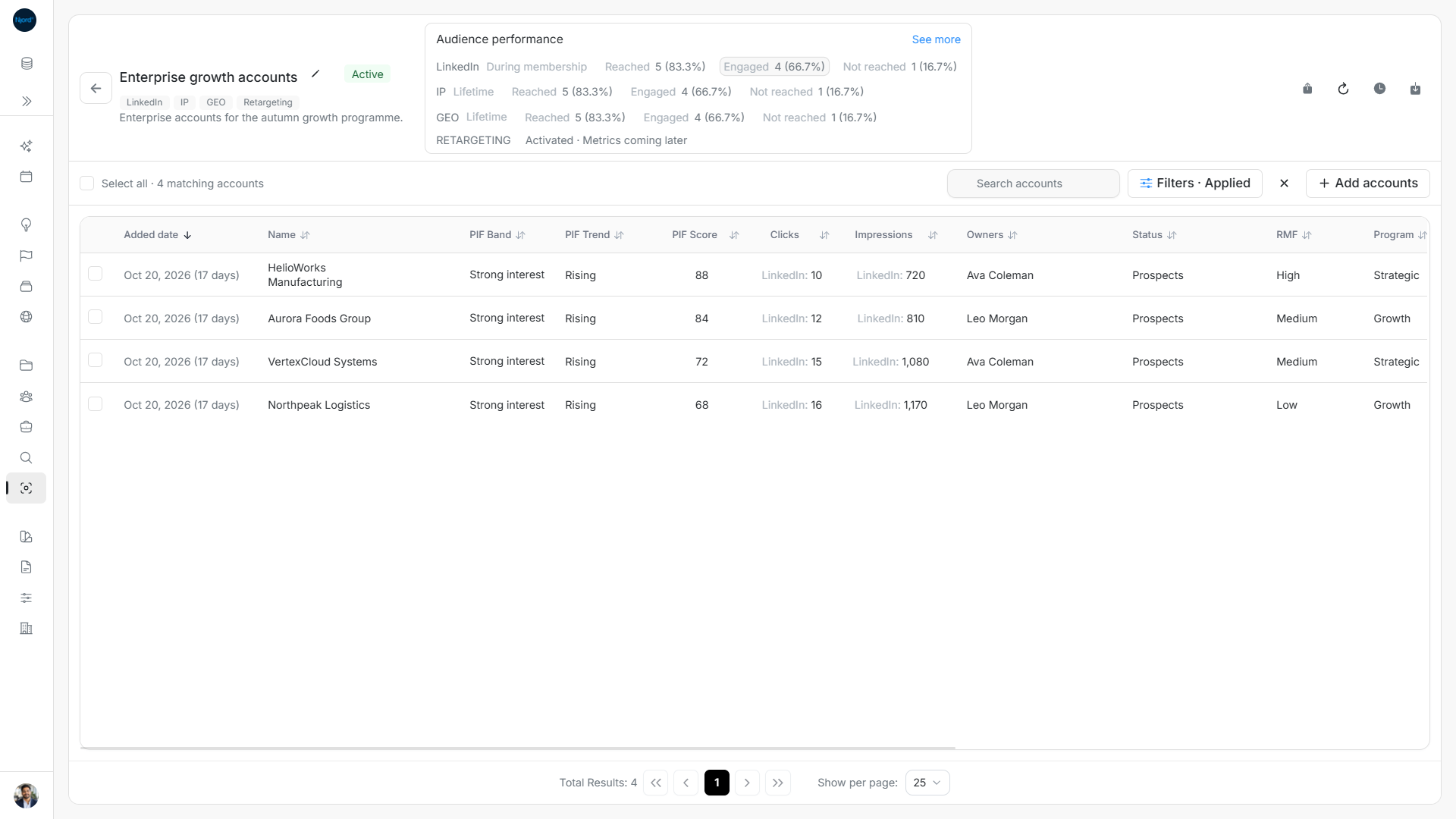
Image guide: Choosing LinkedIn Engaged narrows the current roster to four matching companies.
Find missing results
A dash means unavailable or unknown; zero means a known zero. Some techniques can have results while another does not. Use Retry performance after a load failure, or refresh for changes made by someone else. If Targeting update incomplete appears, use Review update to inspect progress and recovery; saved configuration or membership does not guarantee all targeting updates have finished.
Finish a failed targeting update
Targeting update incomplete means some targeting changes still need to finish. Choose Review update to inspect the affected operation. Read its checked and changed counts, then use Try again when offered. A successful retry clears the warning; the membership roster and historical performance remain separate.
Refresh the results
Performance refreshes after relevant local membership or configuration operations, manual refresh and reopening. There is no continuous statistics polling timer. Each failed performance card has an separate Retry action, so one channel's failed read need not hide another's usable results.
See more explains members included in the performance totals, available members, Not reached, impressions, clicks, click-through rate, measurement basis and server notes. Missing values show a dash rather than an invented zero. Summary figures still describe the full audience group used for performance totals when the current roster is filtered. You can select all matching performance-filtered current members for exclusion, with the same cross-page exceptions and confirmation rules.
If a summary fails to load
Catalog performance loads as cards become visible, with a bounded number of concurrent requests. A failed card can be retried independently. Opening or closing a history panel does not start a continuous statistics timer. Closing Changes stops that panel's history polling; operation progress and performance refresh retain their own rules.
Work through a filtered performance example
Suppose the historical LinkedIn summary reports six engaged companies, but the current member roster has five. Open the metric’s details, then choose Engaged. The roster shows current members matching that technique; a former member can still contribute to the historical summary. An ordinary country filter narrows the current roster further without rewriting the historical cohort. Choose Engaged again to clear that performance filter. Check the visible filter summary before exporting or excluding members.