Memory

Memory
The brain icon in the Njord AI composer is Memory. It does not save a note by itself. It explains how to ask Njord AI to remember a detail, show what it already remembers, or forget something you no longer want kept.
Image guide: The composer has no typed message. The suggestion in the box says Turn recent signals into clear next actions. The brain icon sits to the right of the model menu, which shows GPT-6 Sol (recommended) in this workspace. A note above the box says Njord AI searches the workspace and that files are attached manually. The brain control says Memory is on.
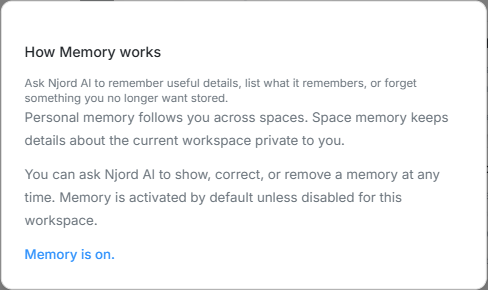
Image guide: How Memory works says you can ask Njord AI to remember useful details, list what it remembers, or forget something you no longer want stored. Personal memory follows you across spaces. Space memory keeps details about the current workspace private to you. The status line says Memory is on.
Where it sits in DOE: Njord AI, in the composer beside the model menu.
Open the explanation: In Njord AI, choose the brain icon beside the model menu to open How Memory works. The icon also shows whether Memory is on or off.
Personal Memory And Space Memory
| Memory | What it keeps | Who can see it |
|---|---|---|
| Personal memory | Details that should follow you from one workspace to another. | Only you. |
| Space memory | Details about the workspace you are in now. | Only you, in that workspace. |
Space memory is not the workspace AI instructions on Context. Those instructions apply to everyone, and an Admin or Client admin edits them on Context. Memory stays private to you. See AI instructions and memory.
Ask Njord AI To Remember, List, Or Forget
Type the request in the message box. The brain icon only opens the explanation.
| What you want | What to ask |
|---|---|
| Keep a detail | Remember that ... |
| See what is stored | What do you remember? |
| Fix a stored detail | Correct the memory that ... |
| Remove a detail | Forget ... |
You can ask Njord AI to show, correct, or remove a memory at any time.
If Memory Is Off
Memory is on by default unless it has been turned off for the workspace. The brain icon then says Memory is off, and the dialog asks you to have an admin activate Memory for this space.
Another workspace can show a different status. Use the status on the brain icon in the workspace you have open.
Use It As A Command
Ask Njord AI to store a detail, then ask it to use that detail later. The brain icon does not save the note. The message does.
| What you want | What to ask |
|---|---|
| Add | Remember that our LinkedIn posts use short sentences and no hashtags. |
| Change | Update the LinkedIn style you remember: one hashtag is allowed. |
| List | What do you remember about how I write? |
| Search | What LinkedIn style do you remember? |
| Remove | Forget my LinkedIn style. |
Personal memory follows you across spaces. Space memory stays in the workspace where you stored it. Nobody else can read either one.