PIF and performance cards
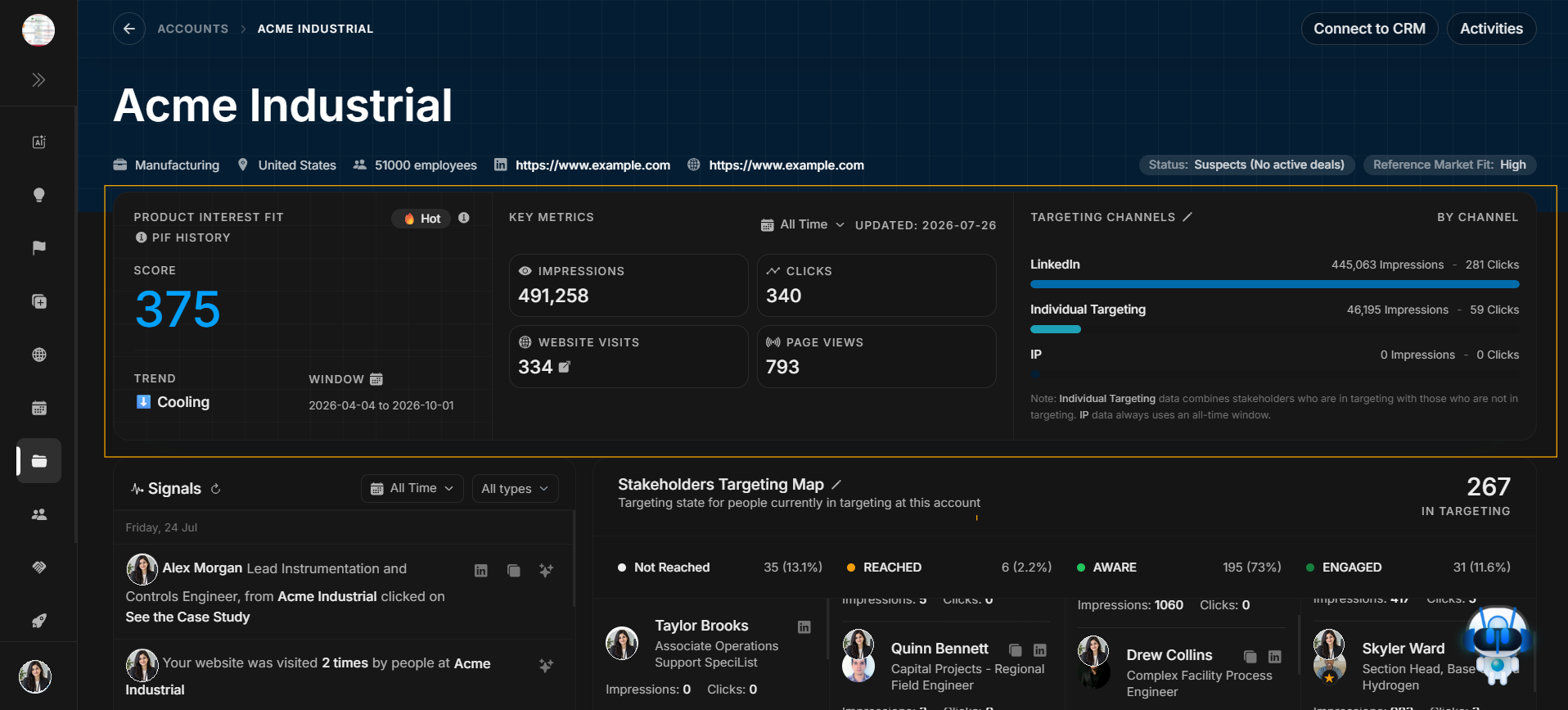
PIF and performance cards
Use the top performance cards to understand whether the account is showing meaningful interest and whether that interest is turning into reach or engagement.
Image guide: The highlighted row contains Product Interest Fit, Key Metrics, and Targeting Channels. Read these together instead of treating one number as the full answer.
What each card answers
| Card | Question it answers |
|---|---|
| Product Interest Fit | Is this account showing strong fit or intent? |
| Key Metrics | What measurable activity is happening around the account? |
| Targeting Channels | Which channels are active or useful for targeting this account? |
Check the time period
The Product Interest Fit window is separate from the Key Metrics date range. Key Metrics defaults to All Time, and its selector also controls Targeting Channels. Check both periods before comparing the score with activity totals.
On this account summary, IP and Geo data are cumulative: their channel rows and contributions to total impressions and clicks appear only for All Time. A shorter or custom range excludes them.
Step-by-step
- Check the PIF score and label.
- Compare the score with key metrics.
- Look at targeting channels to see where engagement can happen.
- Move to Live Signals for the real activity behind the score.
- Move to Stakeholders Targeting Map to see which people are reached.
Avoid this mistake
Do not use PIF alone as a final sales answer. PIF is a signal, not a decision. Confirm it with signals, stakeholders, deals, and activity.