Create events
Create events
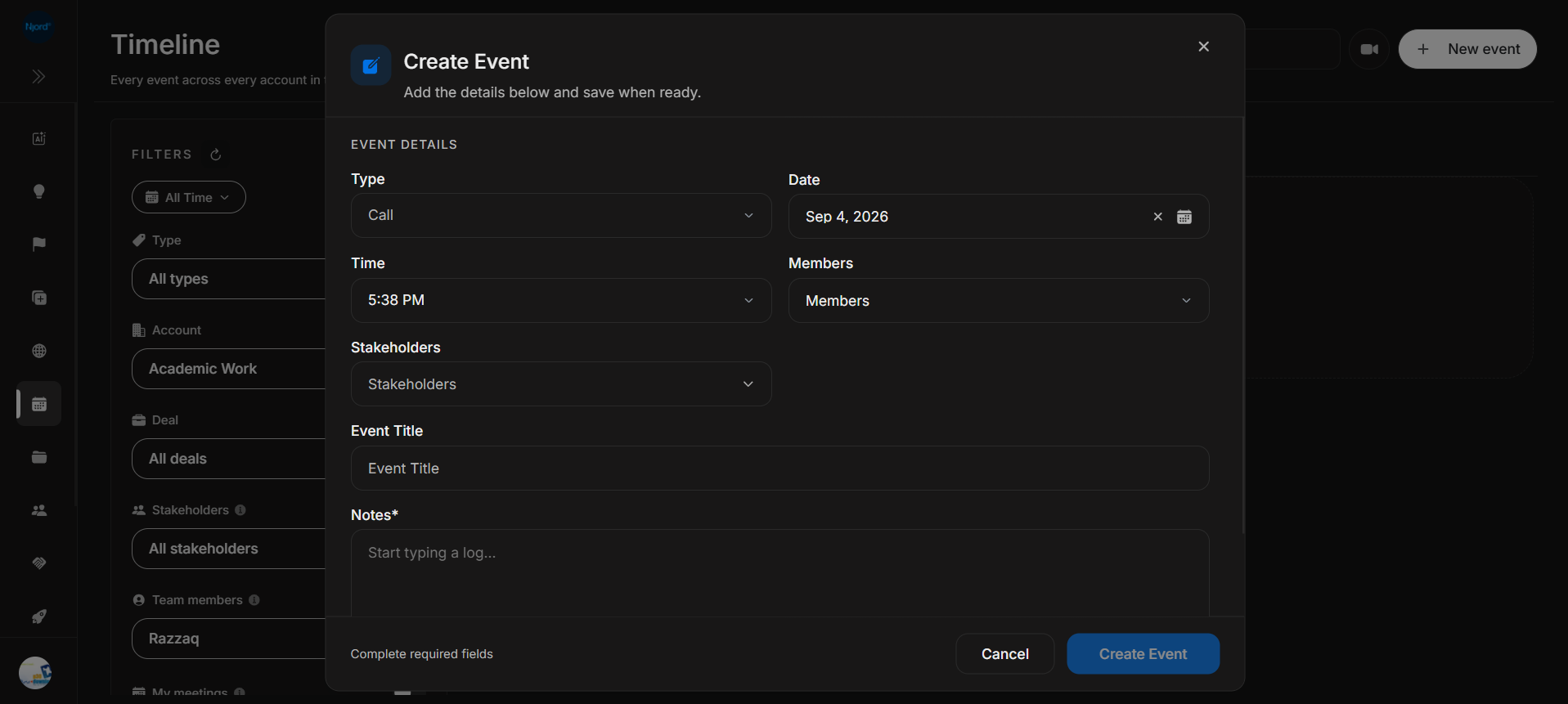
Create Event lets users manually log activity on the Timeline. Use it for calls, notes, messages, meetings, or other activity that should be visible in the workspace chronology.
Where it sits in DOE: Timeline > New event.
Image guide: the dialog captures event details in a two-column form. The Create Event button stays disabled until required fields are complete.
Form Components
| Field or control | What it does | Notes |
|---|---|---|
| Type | Chooses the event category, such as Call. | This affects the event icon, tab grouping, and filter. |
| Date | Sets the event date. | The dialog can default to the current date. |
| Time | Sets the event time. | The card shows this time in the feed. |
| Members | Adds internal workspace users. | Use for people from the team connected to the event. |
| Stakeholders | Adds external stakeholders. | Use for people from the account or deal context. |
| Event Title | Names the activity. | Keep it short and recognizable in the feed. |
| Notes | Captures the activity detail. | Notes is required. |
| Cancel | Closes the dialog without saving. | Use when the event should not be created. |
| Create Event | Saves the event when required fields are complete. | Disabled until the dialog has enough information. |
| Close icon | Closes the dialog. | Same outcome as cancel if nothing is saved. |
| Footer message | Shows guidance such as Complete required fields. | Check this message when the save button is disabled. |
Suggested Workflow
- Click New event from Timeline.
- Choose the event Type.
- Confirm Date and Time.
- Add Members and Stakeholders when they are known.
- Add a clear Event Title.
- Write Notes with the decision, next step, or meeting outcome.
- Create the event when the button becomes available.
- Confirm it appears in the correct date group and type tab.
When To Link People
Add Members when a teammate attended, owns, or should be associated with the activity.
Add Stakeholders when a customer, prospect, partner, or external contact is part of the activity. Stakeholder links make later account, deal, and people reviews easier.
Validation And Disabled States
| State | Meaning | Fix |
|---|---|---|
| Create Event disabled | Required fields are missing. | Complete the required fields shown in the form. |
| Complete required fields | The dialog is waiting for required values. | Check fields marked with an asterisk. |
| Stakeholder/member list empty | No matching people are available in the selector. | Search again or check account/deal context. |
| Event appears under no type tab | The selected type may not match the current filter. | Clear Type filter or open All events. |
Good Event Notes
Good Timeline notes are short, factual, and useful to the next person who opens the account or deal. Include what happened, why it matters, and the next action when there is one.
Avoid notes that expose private meeting content to people who should not have workspace access.