Targeting summary
Targeting summary
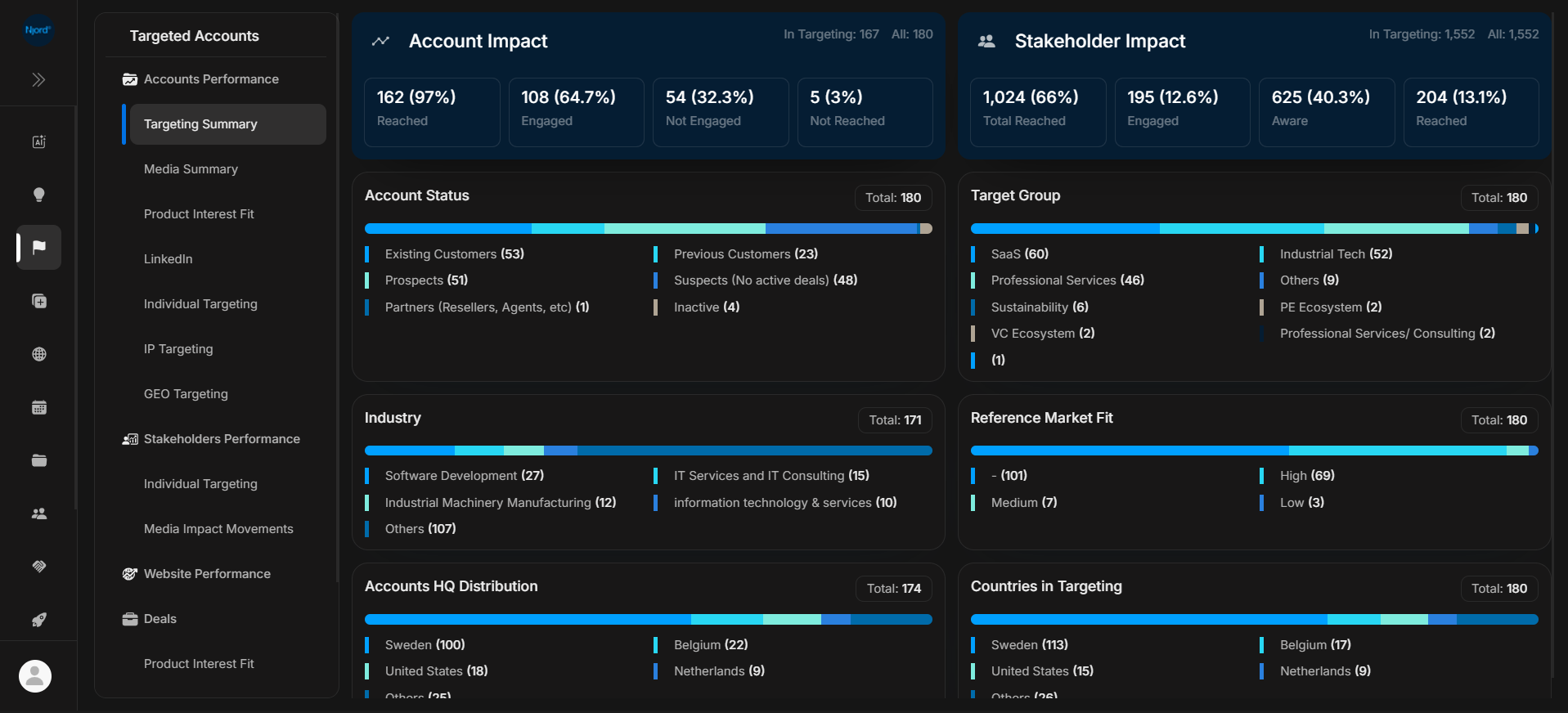
Targeting Summary is the first report to open when you want the big picture for target accounts. It shows whether accounts and stakeholders are covered, reached, engaged, missing activity, or concentrated in particular segments.
Where it sits in DOE: Reports > Targeted Accounts > Accounts Performance > Targeting Summary.
The top of the page shows account impact and stakeholder impact. The cards below break the same workspace into account status, target group, industry, Reference Market Fit, headquarters distribution, and countries in targeting.
Use This Report To
| Need | How this report helps |
|---|---|
| Check coverage | Compare accounts in targeting with the full account set. |
| Understand account impact | See how many accounts are reached, engaged, not engaged, or not reached. |
| Understand stakeholder impact | See how many stakeholders are reached, aware, or engaged. |
| Find targeting gaps | Look for missing industries, countries, target groups, or statuses. |
| Prepare a review | Use the charts as the starting evidence before opening detailed reports. |
How To Read The Top Cards
| Card | What the card tells you |
|---|---|
| Reached | Accounts or stakeholders with reach evidence. |
| Engaged | Accounts or stakeholders with stronger interaction evidence such as clicks. |
| Aware | Stakeholders with awareness-level evidence. |
| Not engaged | Accounts reached but not showing deeper engagement. |
| Not reached | Accounts with no reach evidence in the view. |
Do not add these numbers together unless the card labels clearly say they are separate. Some impact states can overlap depending on the metric.
How To Read The Breakdowns
| Breakdown | What to check |
|---|---|
| Account Status | Whether the target list is mostly prospects, existing customers, suspects, inactive records, or another account category. |
| Target Group | Whether the right market segments or account lists are represented. |
| Industry | Whether the report matches the industries your team is currently focused on. |
| Reference Market Fit | Whether fit values are present and distributed as expected. |
| Accounts HQ Distribution | Where target accounts are headquartered. |
| Countries in Targeting | Which countries are included in targeting activity. |
Each bar is a distribution. A large "Others" value usually means the list has a long tail of smaller categories or inconsistent field values.
Review Order
- Confirm the workspace.
- Check the account impact card first.
- Check stakeholder impact next.
- Look for unusually large missing, inactive, or "Others" groups.
- Open the matching detailed report when you need the row list.
- Open the account before changing ownership, status, targeting, or follow-up.
When To Open Another Report
| If you notice... | Open next |
|---|---|
| Many accounts are reached but not engaged | Media Summary |
| Strong impact but unclear priority | Product Interest Fit |
| Stakeholder impact needs person-level proof | Stakeholders > Individual Targeting |
| GEO or country coverage looks wrong | GEO Targeting |
| Website activity should explain the movement | Website Performance |
| Numbers differ from Insights | Report Data Freshness |
If It Does Not Look Right
Clear filters, refresh the page, and confirm the workspace. If a segment, industry, country, or fit value looks empty, the underlying account field may be missing, inconsistent, outside the current scope, or waiting for refresh.