Product Interest Fit
Product Interest Fit
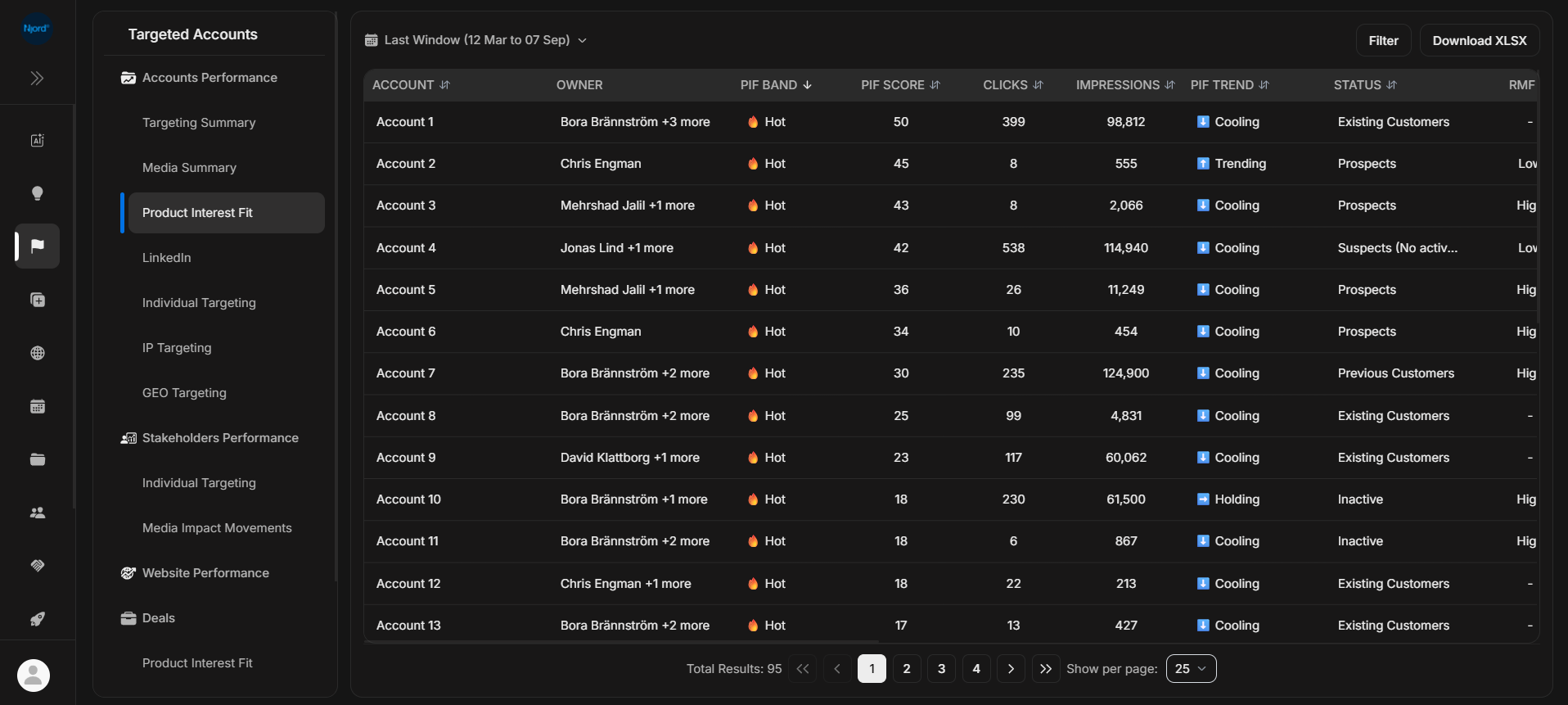
Product Interest Fit ranks target accounts by how strongly they match the workspace's fit setup and available engagement evidence. Use it to decide which accounts deserve review first.
Where it sits in DOE: Reports > Targeted Accounts > Accounts Performance > Product Interest Fit.
The report is built for prioritization. It combines account, owner, fit, trend, media activity, status, and supporting context in one table.
Use This Report To
| Need | How this report helps |
|---|---|
| Find high-priority accounts | Sort by PIF band or PIF score. |
| Compare fit with activity | Check clicks and impressions beside the fit values. |
| Spot movement | Use PIF trend to see whether an account is trending, holding, or cooling. |
| Check qualification context | Compare status, RMF, program, stakeholders, and engagement patterns. |
| Prepare account review | Open the account or PIF details before assigning follow-up. |
Main Columns
| Column | What the column tells you |
|---|---|
| Account | Target account being scored. |
| Owner | Account owner or owners. |
| PIF Band | Fit group, such as Hot, based on the configured PIF setup. |
| PIF Score | Numeric fit value for more precise ranking. |
| Clicks and Impressions | Media activity supporting or contradicting the fit signal. |
| PIF Trend | Whether the account is trending, holding, or cooling. |
| Status | Current account status. |
| RMF | Reference Market Fit value where available. |
Additional columns may include program, unique stakeholders, engagement patterns, deal closing date, closing probability, deal value, last meeting, and next meeting. Use horizontal scrolling or the row detail view when the table is wider than the screen.
How To Read PIF
| Pattern | What it usually means |
|---|---|
| High PIF and recent clicks | Strong candidate for account review. |
| High PIF but little activity | Good-fit account that may need fresh engagement. |
| Lower PIF but strong recent activity | Worth checking manually; interest may be emerging. |
| Cooling trend | Review whether the account needs nurture, cleanup, or a different next step. |
| Missing PIF | PIF may not be configured or the account may not have enough supporting data. |
PIF is a prioritization signal. It does not replace account context, deal context, or judgment from the team.
Good Next Steps
- Start with high PIF accounts.
- Check whether the same accounts have recent clicks, impressions, website visits, or stakeholder movement.
- Open the account before taking action.
- Open deal context if there is an active opportunity.
- Ask Njord AI for a short account recap when the signal needs interpretation.
If It Does Not Look Right
Check the selected duration. Product Interest Fit uses fit windows such as Last window, Last 30 days, or Last 7 days. If fit values are missing across many accounts, the workspace may need PIF setup or refreshed account data.