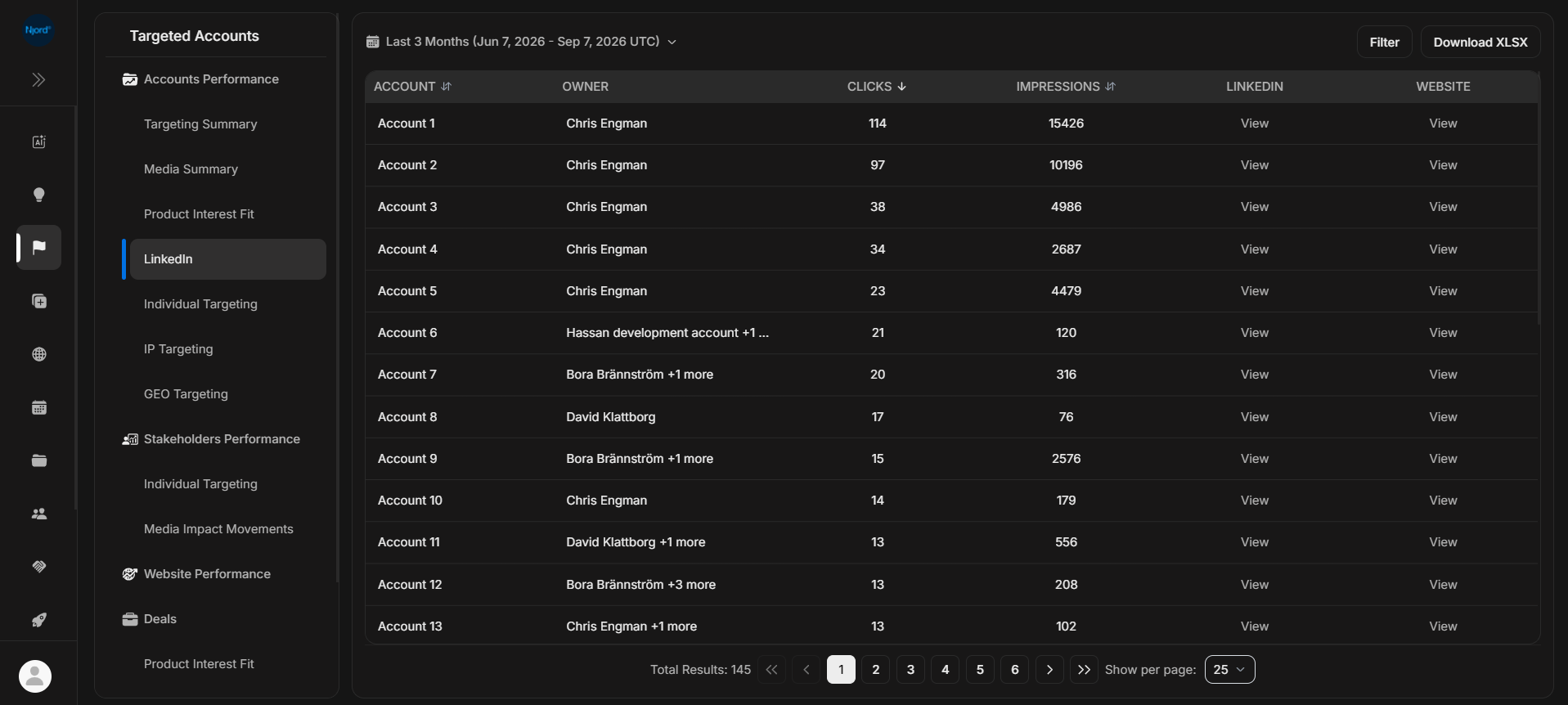
The LinkedIn report shows account-level LinkedIn media activity for target accounts. Use it when you need the detailed table behind LinkedIn engagement in Insights.
Where it sits in DOE: Reports > Targeted Accounts > Accounts Performance > LinkedIn.
The table is simple on purpose: it helps users compare target accounts by LinkedIn clicks and impressions, then open the account, LinkedIn page, or website for context.
Use This Report To
| Need | How this report helps |
|---|---|
| Check LinkedIn activity | See which accounts clicked or received impressions. |
| Validate an Insight | Open the detailed row list behind a LinkedIn signal. |
| Compare accounts | Sort by clicks or impressions. |
| Add context | Use View links for LinkedIn and website context. |
Main Columns
| Column | What the column tells you |
|---|---|
| Account | Target account connected to LinkedIn activity. |
| Owner | Account owner or owners. |
| Clicks | LinkedIn clicks counted for the selected report period. |
| Impressions | LinkedIn exposure counted for the selected report period. |
| Opens the account's LinkedIn page when available. | |
| Website | Opens the account website when available. |
LinkedIn activity uses provider/report-day timing in UTC. Use the same duration when comparing it with Insights or an export.
How To Read It
Clicks are stronger evidence than impressions, but neither proves that a buyer is ready to buy. Open the account when LinkedIn activity appears together with website visits, stakeholder movement, high PIF, or an active deal.
If It Does Not Look Right
Clear filters, widen the duration, and confirm the account is in targeting. If the View link is missing or opens the wrong place, the account's LinkedIn or website field may need cleanup.