Choose model and reasoning
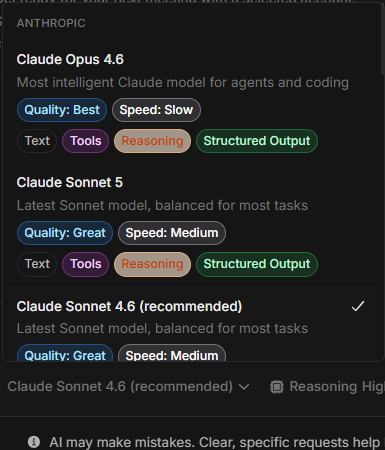
Choose model and reasoning
Njord AI may show a model picker and reasoning choices. These controls affect how the assistant works through a question. Most users should keep the default settings unless they need speed or deeper analysis.
Image guide: the model picker shows the models available in your workspace. Availability can vary, so use the labels shown in your own menu rather than expecting every workspace to look identical.
What The Model Picker Does
The model controls the style, speed and depth of the answer. A faster model can be enough for short summaries and rewrites. A stronger model is better for broad comparisons, complex signal interpretation and leadership-ready analysis.
Use the default model for normal work unless the answer clearly needs a different tradeoff.
What Reasoning Means
Reasoning controls how much effort Njord AI spends working through the problem when the selected model supports it.
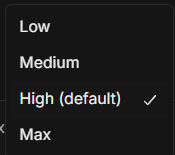
Image guide: this menu shows reasoning options. Higher reasoning can help with complex analysis, but it can also take longer.
Which Setting Should I Use?
| Task | Suggested setting |
|---|---|
| Rewrite or shorten text | Default or faster option. |
| Simple account summary | Default model and default reasoning. |
| Signal explanation | Default setting, then ask for evidence if needed. |
| Account comparison | Stronger model or higher reasoning if available. |
| Website Leads ranking | Stronger model or higher reasoning if the list is large. |
| Leadership summary | Higher reasoning if available. |
Keep Settings Stable Inside A Chat
If you want consistent tone and reasoning, keep the same model inside one chat. If you switch models, tell Njord AI what you want to change:
"Answer again with deeper reasoning and show the evidence behind the ranking."
When Settings Matter Less Than Prompt Quality
A clear prompt with the right context usually matters more than changing models. Before changing settings, check whether your prompt has:
- A clear subject.
- A time range.
- The requested output.
- The right attached records.
Remembered Settings
Your model and reasoning choice is remembered for that chat. A new chat can use a different setting, and changing workspace does not carry a chat-specific choice into the new workspace.
If A Setting Is Missing
Not every workspace shows every model or reasoning option. This is normal. Use the available default and improve the answer through better context and follow-ups.