Live signal alerts
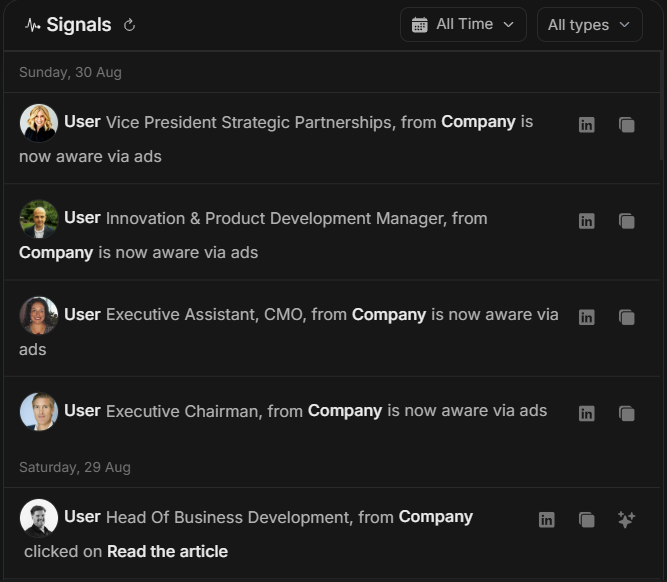
Live signal alerts
Live signal alerts surface recent account and stakeholder activity so you can decide what deserves attention now. They appear in Signals & Insights and can also support related account, stakeholder and Njord AI workflows.
Use live signals as an early warning system for market movement. Then check the related details before acting.
Image guide: the Signals feed shows recent activity grouped by date. The date range and type filters let you narrow the feed to the alert type you care about, such as stakeholder clicks or website visits.
Where Signals Can Appear
Signals can appear in:
- The Signals feed on the Insights page.
- Mobile signal groups or accordions.
- Account or stakeholder activity views.
- Top Engagements rankings.
- Njord AI prompts started from a signal or record.
Signal Types
| Signal | What it means | How urgent it usually is |
|---|---|---|
| Stakeholder Click | A stakeholder clicked tracked content or ad activity. | Higher, especially for important roles and target accounts. |
| Stakeholder Aware | Activity indicates awareness. | Medium, useful for progression and campaign review. |
| Stakeholder Reached | A stakeholder was reached through media activity. | Contextual, useful for coverage checks. |
| Website Visit | People from a company visited your website. | Higher when visits are recent, repeated, or high intent. |
Use A Live Signal
- Read the signal type and date.
- Check the named account, company, or stakeholder.
- Open the row action when the record is relevant.
- Compare with recent Top Engagements or website activity.
- Ask Njord AI for a short explanation if several signals point to the same account.
- Decide whether to follow up, investigate, route, or leave it for later.
What Makes An Alert Useful
An alert is more useful when it is:
- Recent.
- Connected to a target account.
- Connected to a relevant stakeholder role.
- Repeated across multiple events.
- Supported by website activity or other engagement.
- Connected to an active campaign or sales motion.
What Not To Assume
A signal is not automatically a buying signal. A single visit, reach event, or click should be checked against role, account fit, campaign context, website pages visited and recent activity history.
Do not expose tracked activity in external messages. Use signals to help your team prioritize and prepare.
Good Njord AI Prompts
- "Explain the most important live signals from today."
- "Which alerts should sales act on first?"
- "Group this week's signals by account and summarize the pattern."
- "Which signals are only coverage context and which look like real engagement?"
If There Are No Alerts
No alerts can mean the selected time range has no matching activity, the signal type filter is too narrow, or the workspace does not have recent tracked activity. Widen the date range, switch back to All types and check related reports before concluding there is no activity.