Read the Campaigns and Ads tables
Read the Campaigns and Ads tables
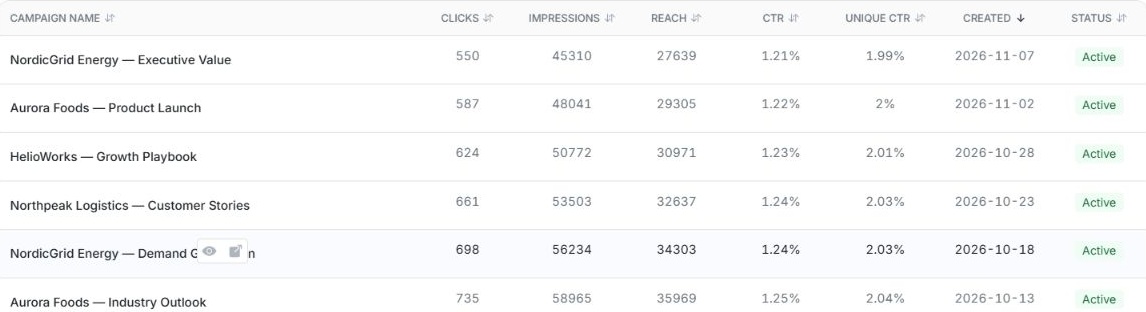
Open Ad Library and choose Campaigns or Ads. Choose Switch to list view to compare rows side by side. Check Platform, status and the performance period before comparing results.
| Column | What to read |
|---|---|
| Campaign Name or Ad Name | Identifies the item. In Ads, the campaign name can appear below the ad name. Use the preview for the creative and copy. |
| Clicks | How many clicks were counted in the period. |
| Impressions | How often the ad was shown. A person can account for several impressions. |
| Reach | The reported count of distinct people reached, where available. |
| CTR | Click-through rate. Use it to compare clicks against impressions. |
| Unique CTR | The click rate based on distinct people where the platform supplies it. |
| Created | When the campaign or ad was created. Check the separate performance dates for the metrics. |
| Status | The campaign or ad's current state. Not delivering can appear alongside Active. Check both before assuming the ad is being shown. |
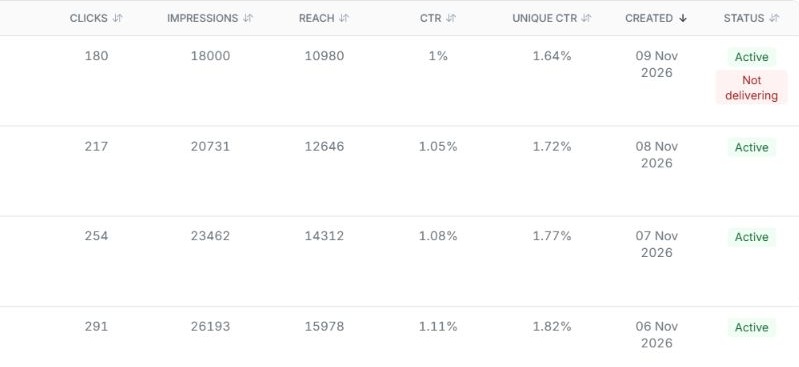
From Campaigns use View ads on a specific campaign to inspect the ads within it. For a broader comparison, use Ads and check the campaign filter. In Individual Targeting, read the fixed reporting period. In LinkedIn, use the date controls available for the chosen view. A dash or omitted metric means the view has no value to show.