Read Connection Status
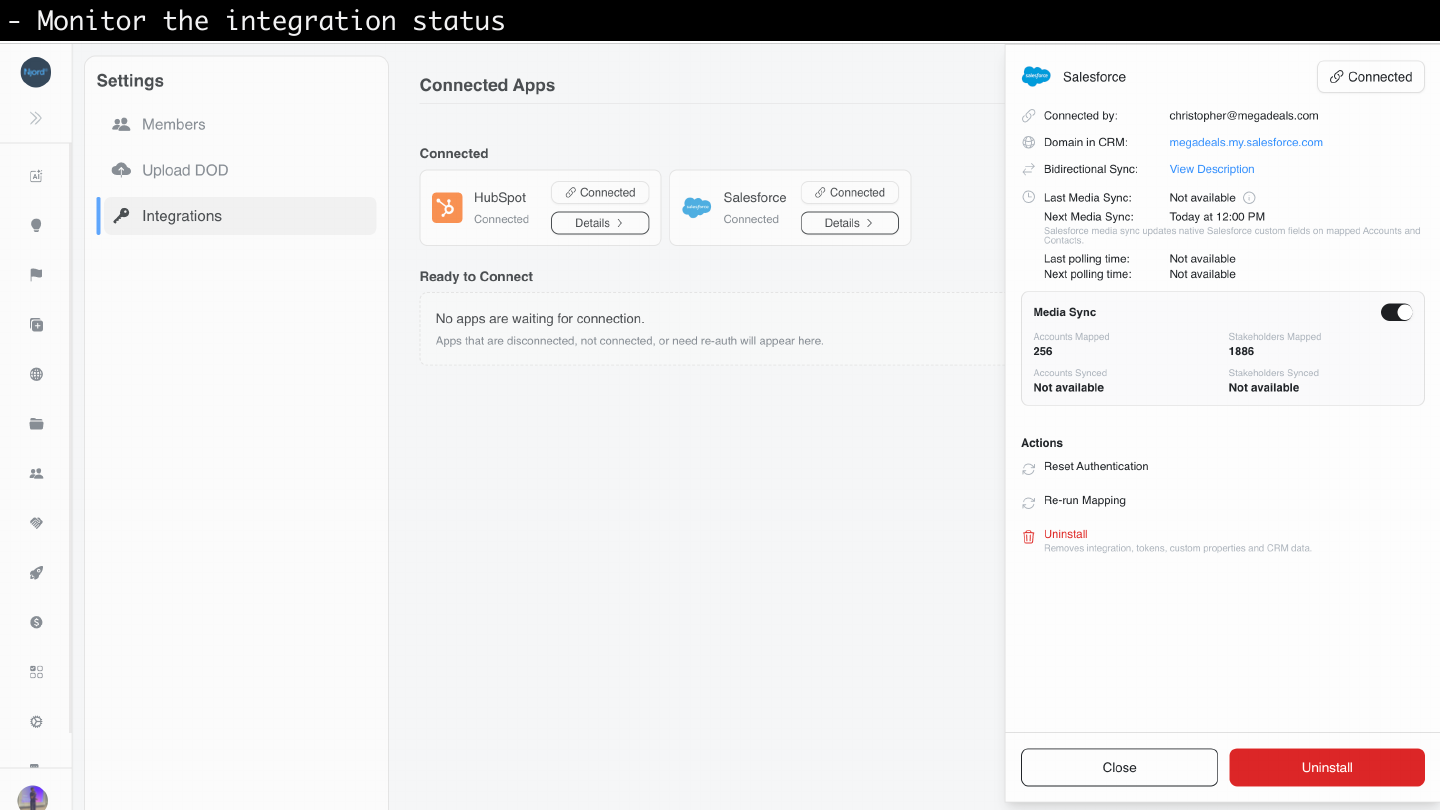
Read Connection Status
Open Settings > Integrations and read the Salesforce card. Select View Details for the full status panel.
Image guide: The Salesforce details panel summarizes connection identity, media sync, polling schedule, mapped record counts, setup warnings, and owner-only actions.
Status On The Salesforce Card
| Status | Meaning | What to do |
|---|---|---|
| Not connected | Salesforce is not connected for this workspace. | Select Connect after the package is installed. |
| Connected or Active | Salesforce is healthy and ready for mapping, import, export, and sync. | No action is needed. |
| Setup incomplete | Salesforce is connected but first-time setup was not finished. | Open View Details and resume setup. |
| Re-auth required | Salesforce credentials need to be renewed. | Select reconnect or reset authentication. |
| Error | DOE found an integration issue that is not only an auth renewal. | Open View Details and follow the suggested action. |
| Disconnecting | DOE is removing mappings and integration context. | Wait for cleanup to finish. |
Details Panel
The details panel can show the connected Salesforce org, Salesforce domain, connection owner, media sync state, polling state, setup warnings, mapped account count, mapped stakeholder count, latest sync results, sync failures, and actions such as Pause sync, Resume sync, Reset authentication, Re-run Mapping, and Disconnect.
Use View Details when the card shows a warning, when counts look different than expected, or when you need to re-run mapping after cleaning up domains or emails.
Salesforce-Specific Blocks
| Status area | What it means |
|---|---|
| Media Sync | DOE media, PIF, targeting, and link fields are synced to mapped Salesforce Accounts and Contacts. |
| Polling | Salesforce inbound changes are collected on a schedule. |
| Setup | DOE checks whether expected Salesforce fields, widgets, and permissions are available. |
| Actions | Re-auth, re-run mapping, and disconnect are owner-managed operations. |
Counts And Sync Health
Mapped account and stakeholder counts tell you how many DOE records are connected to Salesforce objects. These counts can be lower than your total record count when records are not yet imported, exported, or manually connected.
Media sync health tells you whether DOE fields and widgets are receiving updated data. If sync is paused or failing, profile mappings can still exist, but Salesforce may not show fresh DOE media values until the issue is fixed.
Polling health tells you whether Salesforce-side changes are flowing back into DOE. If polling is stale, open View Details and review the warning before relying on inbound updates.
When To Re-run Mapping
Use Re-run Mapping after you clean up domains, websites, or stakeholder emails. Re-running mapping can find new safe matches, but it should not overwrite confirmed existing mappings unless the product asks you to review a conflict.