Import Stakeholders From HubSpot
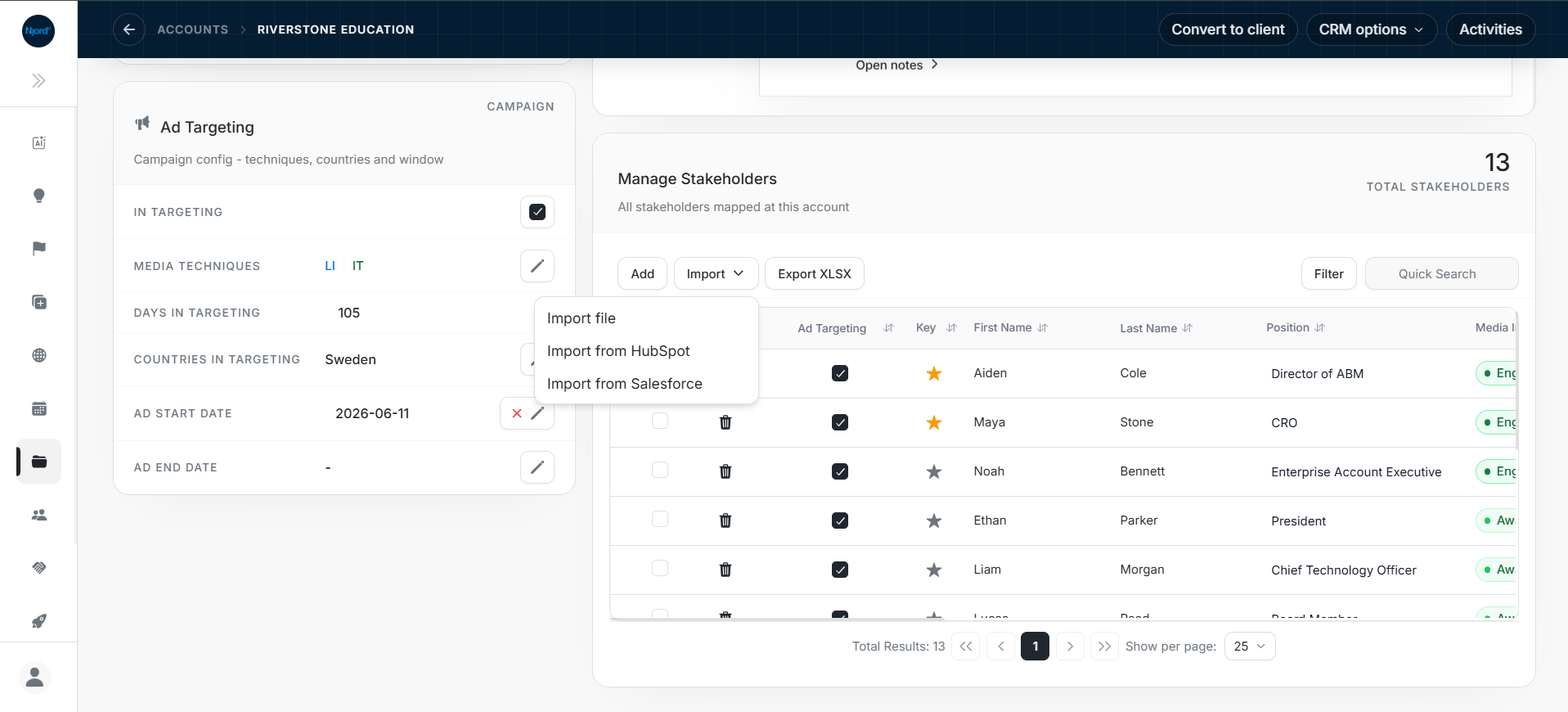
Import stakeholders from HubSpot
Use stakeholder import when the DOE account already exists and HubSpot contains contacts that should become stakeholders under that account.
Image guide: Start inside the DOE account so DOE can show the HubSpot contacts for the correct company.
Video guide: The walkthrough continues from account import into stakeholder selection and review.
Before you start
- Confirm the DOE account is active and verified.
- Confirm the account is connected to the correct HubSpot company.
- Confirm no other CRM import is already running in the workspace.
- Open the stakeholder area inside that account.
Import step by step
- Select Import in the account's stakeholder area.
- Choose Import from HubSpot.
- Search or scroll through the contacts.
- Select the people who should belong to this DOE account.
- Start the import.
- Review created, updated, warning, and skipped rows.
- Open each important stakeholder and confirm View in HubSpot is available.
Rows already mapped in DOE cannot be selected again, but their HubSpot links can still be opened for verification.
How DOE decides whether to create or update
DOE first checks the saved HubSpot contact ID. If no saved link exists, DOE may use one unique email match inside the selected DOE account. It does not use a same-email contact from another company as an automatic match.
Contacts without email can still be imported and connected by the selected HubSpot contact ID. Add an email later when your team needs email-based matching or outreach data.
Common edge cases
| Problem | What to do |
|---|---|
| The DOE account is not connected | Import or connect the account first |
| The DOE account is archived or inactive | Restore and verify the account before importing contacts |
| Contact has no email | Import is still supported when you selected the correct HubSpot contact |
| Duplicate email appears in the same account | DOE skips the unsafe duplicate; compare the people and import or connect the correct one |
| Contact is already mapped to another DOE stakeholder | Review the existing mapping before disconnecting or changing it |
| Contact is associated with another HubSpot company | Confirm the person truly belongs under the selected DOE account before importing explicitly |
| Another import is running | Wait for it to finish and retry once |
| Some rows succeed and others fail | Keep the successful rows and correct only the named failures |
| HubSpot is disconnected | Ask the connection owner to re-authenticate |
Do not move a contact into the wrong DOE account simply because the email looks familiar. Check the mapped parent company and the person's business context.